Notebook.ai Alternatives for Writers Ready to Turn a World Into a Book

Notebook.ai is a hosted worldbuilding notebook, and it has one of the most generous free plans in the category. Starter is free with no card required. It supports up to five universes, unlimited characters, locations, and items, unlimited document storage, an integrated word processor, and 50MB of images. Premium, at around $9 a month, expands that to 29 structured page types, from creatures and deities to languages, governments, religions, and magic systems.
Its best feature is guidance. Detailed templates, progress indicators, and personalised questions help you think through a world you have barely started, and each answer is saved into the right page. Reciprocal links mean that marking one character as another’s parent updates both records.
People usually look for Notebook.ai alternatives at a specific moment: when the world is taking shape and the writing is about to begin. Notebook.ai can hold documents, but it is a notebook first, and it runs in a browser rather than offline on your computer.
This guide compares four alternatives, using each vendor’s own pricing and feature pages, checked in August 2026.
The short answer. To share your world with readers, choose World Anvil. For modular worldbuilding plus a manuscript and phone apps, choose Campfire. For a free, open-source, offline database, choose Fantasia Archive. To keep the world and the novel together in one offline application, choose NovelOS Studio.
Notebook.ai Alternatives Compared
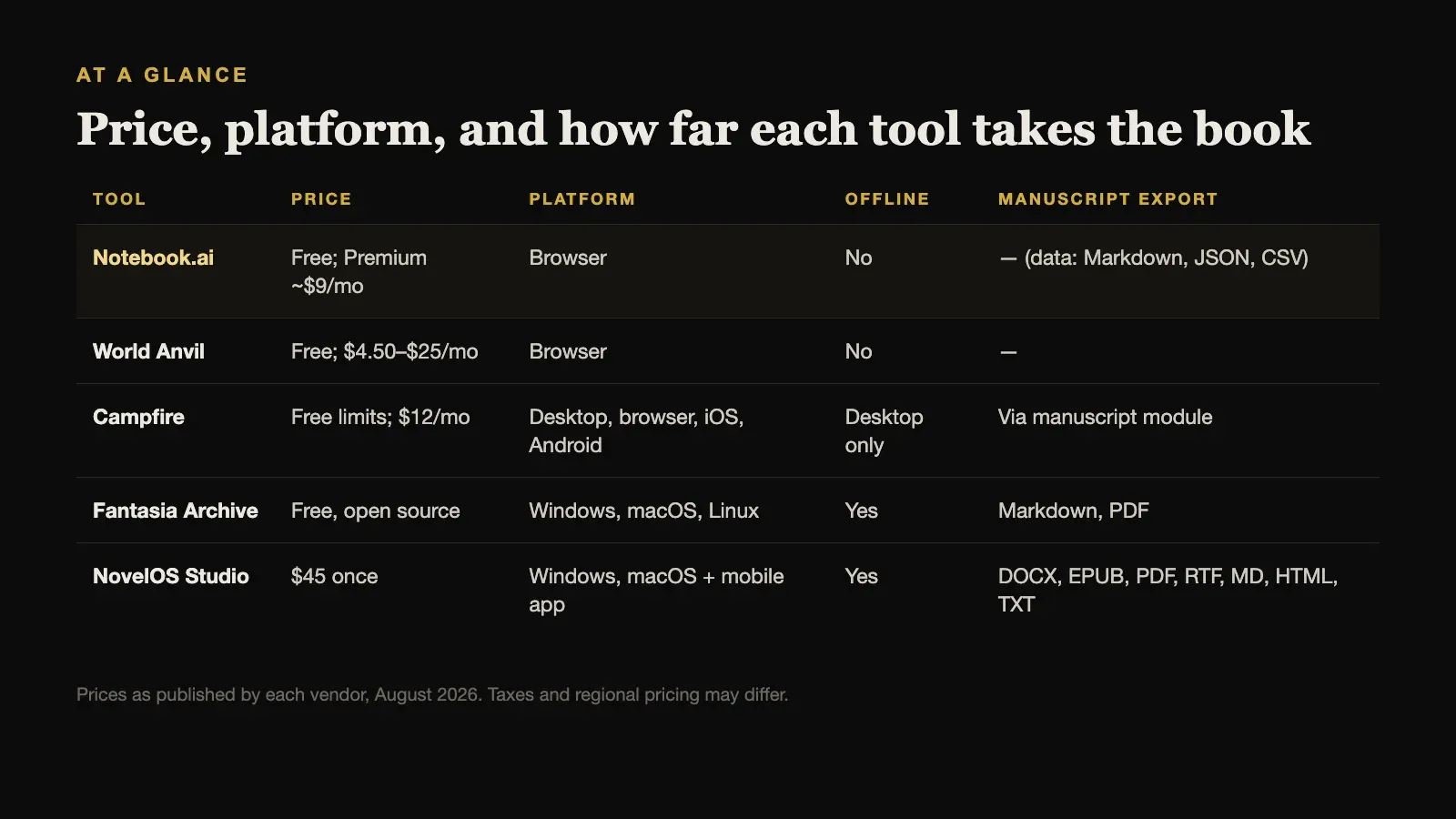
| Tool | Price | Platform | Offline | Manuscript export |
|---|---|---|---|---|
| Notebook.ai | Free; Premium ~$9/mo | Browser | No | — (data: Markdown, JSON, CSV) |
| World Anvil | Free; $4.50–$25/mo | Browser | No | — |
| Campfire | Free limits; $12/mo | Desktop, browser, iOS, Android | Desktop only | Via manuscript module |
| Fantasia Archive | Free, open source | Windows, macOS, Linux | Yes | Markdown, PDF |
| NovelOS Studio | $45 once | Windows, macOS + mobile app | Yes | DOCX, EPUB, PDF, RTF, MD, HTML, TXT |
Prices are as published by each vendor in August 2026 and exclude tax.
What Notebook.ai Does Best
It is worth being precise about what you would give up by switching, because Notebook.ai is genuinely strong in several ways:
- A permanent free tier that is capable enough for a complete world bible.
- Guided structure. The templates and personalised questions are among the best in the category for writers who find a blank page harder than a form.
- Breadth. Twenty-nine page types cover almost any setting system you are likely to need.
- Sharing. Individual pages or whole universes can be made public for feedback, and you can invite unlimited collaborators to a universe.
- Open source. The project is published under the MIT licence, so a technical user can run it themselves.
The limits are about the stage after worldbuilding. Notebook.ai’s public materials do not describe a visual plot board, a manuscript deadline system, or book export. Its data exports cover plaintext outlines, Markdown, CSV, JSON, XML, and YAML, which are useful for reference and portability but are not manuscript formats.
1. World Anvil: Best for Sharing Your World
World Anvil is the natural step up for a world that other people will read. It combines articles, interactive maps with linked markers, timelines, and a reader-facing presentation, with room for a community around it.
Its free Freeman tier is enough to start, and paid tiers cost $4.50, $8.25, or $25 per month when billed annually, adding coauthors and richer map tools such as layers, polygons, and journey lines. Like Notebook.ai, it is a hosted service and needs an internet connection for normal authoring.
Choose World Anvil when readers, players, or patrons will explore the world, and presentation matters as much as organisation.
2. Campfire: Best for Worldbuilding Plus a Manuscript
Campfire keeps Notebook.ai’s modular feel but adds a manuscript module, interactive maps with pins, regions, and nesting, and timekeeping with custom calendars and multiple timelines. It also offers native iOS and Android apps alongside the browser and desktop versions.
You can use it free within per-module limits, including 25,000 manuscript words, 10 characters, 20 timeline events, and 2 maps, and a Standard plan currently displays $12 per month. Desktop modules can work offline, while browser and mobile use require a connection.
Choose Campfire when you want to keep a modular, template-driven feel while starting to write, and phone access matters.
3. Fantasia Archive: Best Free Offline Alternative
If what you like about Notebook.ai is that it is free, and what you dislike is that it is online, Fantasia Archive is worth a look. It is free and open source under the GNU GPL v3, with no subscription or paywall, and it runs as an offline desktop application on Windows, macOS, and Linux. Its twenty built-in record types cover most worldbuilding needs, and everything is stored locally.
The trade-offs are real. The interface is dense and form-driven, backups are manual copies of a project folder, and export is limited to Markdown and PDF. There is no visual plotting, no writing goals, and no manuscript workflow.
Choose Fantasia Archive when cost and offline storage matter most, and you are comfortable with a more technical tool.
4. NovelOS Studio: Best for Turning the World Into a Finished Book
NovelOS Studio is designed for the point where Notebook.ai’s job ends. It keeps a world database, maps, characters and family trees, and custom record properties, then connects all of it to visual plot boards and the manuscript. Each scene is linked to its cast, locations, and objects, so the world you built stays consistent with the chapters you write. Writing goals, deadlines, and a yearly activity view track the draft.
It is not a guided questionnaire in the way Notebook.ai is, and it does not publish worlds to the web. What it offers instead is a single place to build, plot, write, and finish the book, entirely offline on your own computer with no account.
NovelOS costs $45 once for Windows and macOS, and the same licence activates an installable mobile app. It exports the manuscript as DOCX, EPUB, PDF, RTF, Markdown, HTML, or plain text, and moves the whole project between computers as one .novelos archive.
Choose NovelOS Studio when the world is ready and the novel is the next step, and you want both in one application you own.
When Notebook.ai Is Still the Right Choice
Stay with Notebook.ai if you are early in a world and value guidance over structure, if you want a capable tool that costs nothing, or if you want other people to comment on your world as you build it. For a writer still discovering what their setting is, its questions can be more useful than any amount of freeform space.
Many writers use it exactly that way: as a thinking tool for the first months of a project, before moving into a writing application once the book takes shape.
Taking Your World With You
If you do move, Notebook.ai’s data exports make it easier than many hosted tools. Download everything as Markdown for readable notes and JSON or CSV for structured records, and keep both as an archive.
Then decide what the new tool actually needs. A world bible built with twenty-nine page types is often much larger than a single novel requires, so start by bringing across the characters, places, and systems that appear in your first act. The rest can move later, or stay in the archive until a scene needs it.
It also helps to check images separately. Notebook.ai galleries can hold hundreds of reference pictures, and they are the part of a world that is easiest to lose in a move. Download the ones attached to your main characters and locations first.
How to Choose
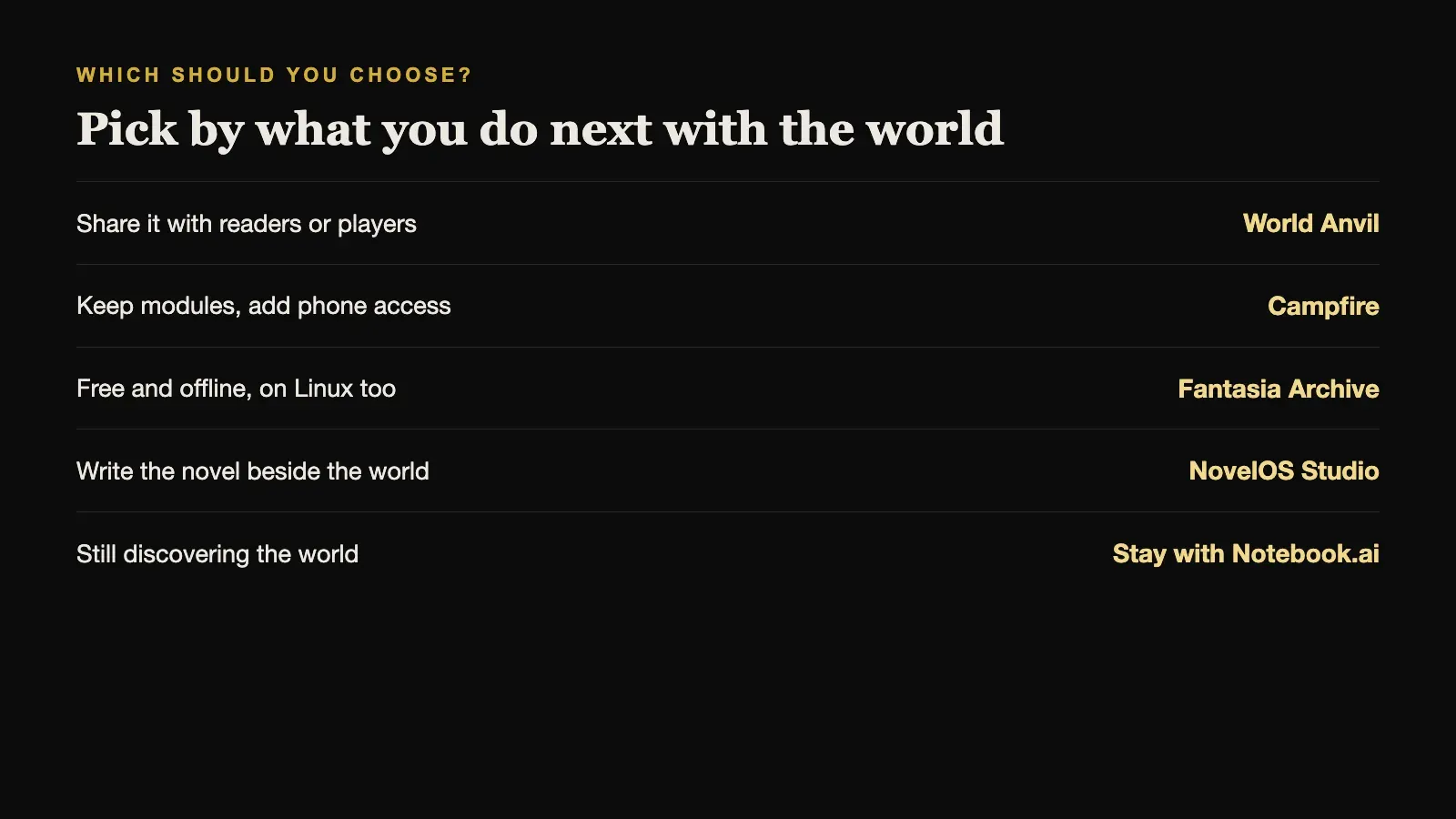
Think about what you will do next with the world.
If you will share it, World Anvil. If you will keep building it but want it offline and free, Fantasia Archive. If you want modules and phone access while you start writing, Campfire. If you are about to write the novel, the most useful thing is to have the world beside the manuscript instead of in another tab, which is what NovelOS Studio is designed for.
Sources and further reading
Prices and features were checked against first-party sources in August 2026 and may change.