 The Alchemist
Line edits with the reason for each change
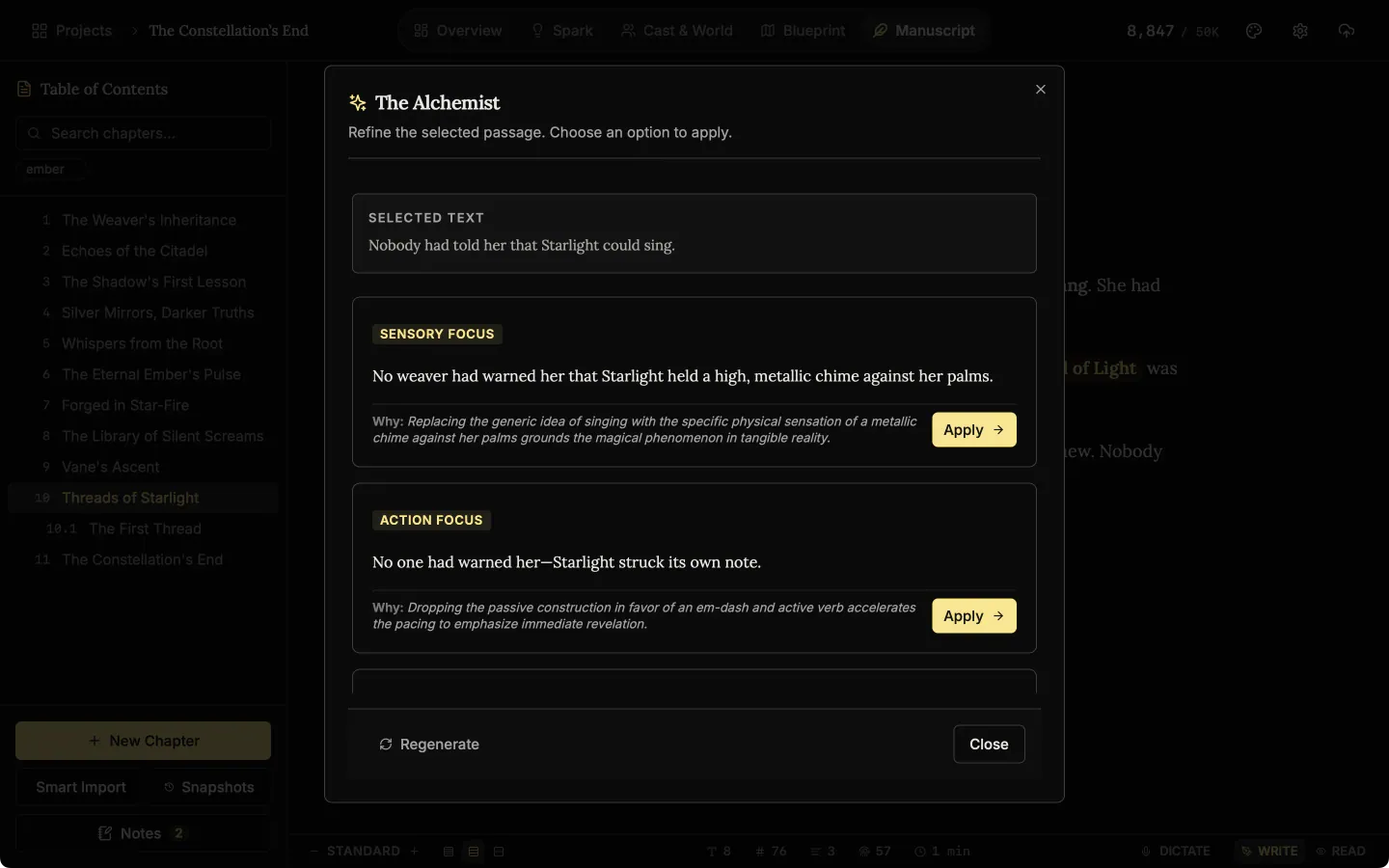
The Alchemist is optional AI line editing for novelists. Select the words you want polished and get three rewrites, each with its reason, to accept or ignore. It runs on your own Gemini or OpenAI key, so you pay the provider and never us.
- $45 once, no subscription
- Windows and macOS
- Phone app included
- AI is optional, on your own key
 Windows
 macOS
macOS
 Mobile
Part of the 25 minute walkthrough. Watch the full tour from the start Watch on YouTube
The video opens on setting up the optional AI. The Alchemist itself is shown in the Manuscript chapter.
The Alchemist: AI rewrites for the sentence you select
Select a sentence and ask The Alchemist. It offers three rewrites, each with the reason for the change. Apply the one you like, or keep your own words. Nothing outside your selection is changed.
Polish only what you select
Select the sentence that is not working and ask The Alchemist for a rewrite. It rewrites only the words you selected, on your own AI key.
Muse: the settings page where you add your own AI key
The AI features run on your own Gemini or OpenAI key. Paste it in on the Muse page in Settings. One key is enough. You pay the provider directly and NovelOS adds no fee. Leave both empty and the app uses no AI at all.
Your own AI key
The AI features use your own Gemini or OpenAI key, stored in the system keychain. Without a key the rest of the app works the same.
Choose the AI quality and how creative it is
On the Muse page, set text quality to Frontier, the strongest model, Balanced, or Economy, the fastest and cheapest. Set Creativity from Precise to Creative.
Quality and creativity
Choose how strong the AI model is and how freely it rewrites. Slide toward Precise for careful edits or toward Creative for bolder ones.
Good to know
- It never rewrites a whole chapter. The Alchemist works on one passage at a time. There is no button that rewrites a chapter. Ignore every suggestion and your text stays exactly as it was.
- Keys stay on the device. Kept in the system keychain on desktop and in encrypted storage on the phone, never in project files.
- On the phone. With nothing selected, The Alchemist polishes the paragraph your cursor is in.
- The other generators. The Oracle drafts characters and The Architect drafts places, lore and maps, on the same key.
Related features
- The manuscript editor
Write the book in chapters and sub-chapters, with Zen, Typewriter and Vanishing modes and search that forgives typos.
- Snapshots
Each chapter keeps old copies of itself. Compare one with the current text and restore it if the rewrite did not work.
- Margin notes
Comment on exactly the words you select, bookmark a paragraph, and work through every note from one list.
- Read aloud and audiobook
Hear a chapter read back with each word lit as it is spoken, and export the book as audio, one track per chapter.
- Characters and family trees
A page for every character, family trees built from your cast, and optional AI concepts from The Oracle.
- Maps and The Architect
Make a map of your world and label it yourself, and draft places and lore with the optional AI.
Common questions
What does The Alchemist change?
Only the words you select. You get your original text, three rewrites and a short reason for each. Apply the one you want, or none.
Will it rewrite my whole book?
No. It works on one passage at a time. There is no button that rewrites a chapter or writes a novel.
Does my writing leave my machine?
Only the passage you send, when you send it, and only to the provider whose key you added. It never passes through our servers.
What does the AI cost?
Nothing to us. You use your own Gemini or OpenAI key and the provider bills you directly. We add nothing on top.
Do I need it to use NovelOS?
No. Everything else works with no AI set up.
Will it flatten my voice?
Not unless you let it. Your original stays on screen beside each rewrite and its reason, so you can turn down a line that sounds like someone else.
Is it included in the $45?
Yes. The feature is included. The provider you choose bills you for usage.
Guides for revision
Exposition in Motion: Give Readers the Right Fact at the Right Moment
Place exposition where readers need it by testing what each fact helps them follow, judge, or reinterpret in the current scene.
Read article
Book Blurb vs Synopsis: Build Promise and Proof
Compare a book blurb with a synopsis, then use a promise-to-payoff ledger to write reader-facing copy and a spoiler-complete submission document.
Read article
A Clarity Test for Every Dialogue Tag
Test dialogue tags by speaker clarity, reset points, placement, action, and rhythm so readers never need to reconstruct who spoke.
Read articleWriting Tips & First Edition Access.
Craft guides and product updates in your inbox.
Finish your story. Keep your tools.
One payment and it is yours. No subscription, no account, no telemetry. Watch the full walkthrough before you buy.