 Chapter Snapshots
Old copies of every chapter, ready to restore
Snapshots are version history for the chapters of a novel. Each chapter keeps old copies of itself. Compare any copy with the current text, see what changed, and restore it if the rewrite did not work.
- $45 once, no subscription
- Windows and macOS
- Phone app included
- Works offline
 Windows
 macOS
macOS
 Mobile
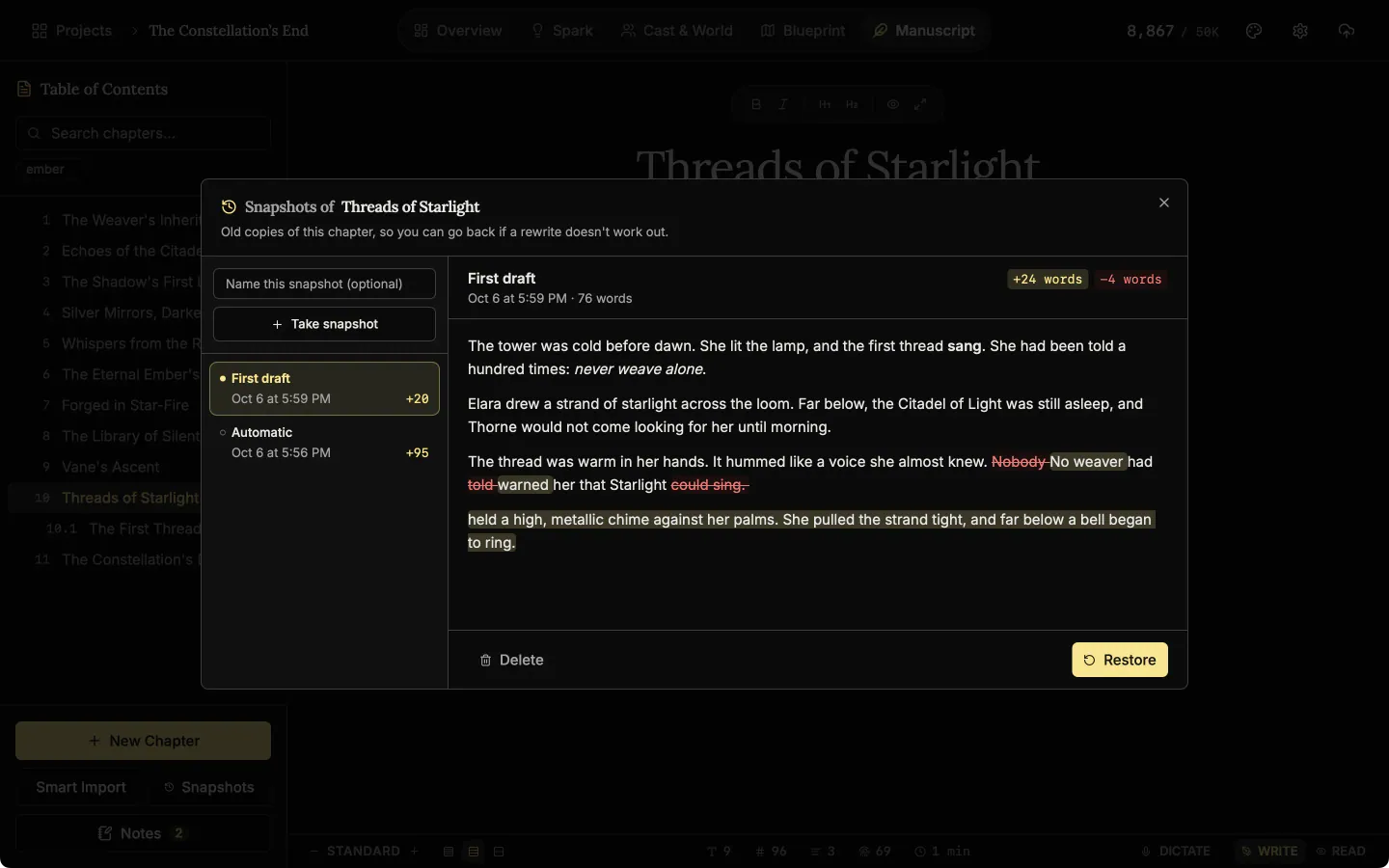
Part of the 25 minute walkthrough. Watch the full tour from the start Watch on YouTube
Keep a copy before a big change
Each chapter keeps copies of itself as you work, and you can take one yourself before a rewrite. Pick a copy to compare: added words are highlighted and removed words are struck through.
Compare a snapshot
Each chapter keeps a history of snapshots. Compare one with the current text to see what was added and what was removed.
Go back without losing the present
Restore a snapshot and the chapter returns to that copy. The text you had is saved as a snapshot too, so a restore can be undone.
Restore a snapshot
Restore a snapshot to bring a chapter back to that version. The current text is kept as a snapshot first.
Good to know
- Snapshots move with the project. They travel between desktop and phone in the .novelos file, and a backup includes them.
- Name the ones that matter. A snapshot you take yourself gets the name you type, such as "before cutting the prologue".
- Per chapter. Going back in one chapter does not touch the others.
- Nothing uploaded. Snapshots are kept in the project on your own device.
Related features
- The manuscript editor
Write the book in chapters and sub-chapters, with Zen, Typewriter and Vanishing modes and search that forgives typos.
- Margin notes
Comment on exactly the words you select, bookmark a paragraph, and work through every note from one list.
- The Alchemist, line edits
Select the words you want polished and get suggested rewrites, each with its reason, to accept or ignore. Optional AI.
- Write by voice
Press Dictate and speak. Your words appear in the chapter with punctuation, and nothing you say leaves your device.
- The phone app
The same studio on iOS and Android with the same licence, and one file that moves a project between devices.
Common questions
Is this version control for my novel?
Yes, for each chapter. Every chapter keeps old copies of itself that you can compare with the current text and restore.
Do I have to remember to take snapshots?
No. Chapters take snapshots automatically. You can also take one yourself and name it.
If I restore an old version, do I lose what I have now?
No. The text you had is kept as a snapshot when you restore.
Do snapshots follow me to my phone?
Yes. They travel with the project, and both apps can compare and restore them.
Is it included in the $45?
Yes, on Windows, macOS and the phone app, with no AI and no account.
Guides for revision
Exposition in Motion: Give Readers the Right Fact at the Right Moment
Place exposition where readers need it by testing what each fact helps them follow, judge, or reinterpret in the current scene.
Read article
Book Blurb vs Synopsis: Build Promise and Proof
Compare a book blurb with a synopsis, then use a promise-to-payoff ledger to write reader-facing copy and a spoiler-complete submission document.
Read article
A Clarity Test for Every Dialogue Tag
Test dialogue tags by speaker clarity, reset points, placement, action, and rhythm so readers never need to reconstruct who spoke.
Read articleWriting Tips & First Edition Access.
Craft guides and product updates in your inbox.
Finish your story. Keep your tools.
One payment and it is yours. No subscription, no account, no telemetry. Watch the full walkthrough before you buy.