AutoCrit Alternatives for Genre Fiction Writers Who Want Their Book Offline

AutoCrit is an online platform for fiction writers that combines prose analysis with story analysis. Its prose tools measure pacing, dialogue, repetition, readability, and more than 25 other factors, and compare your writing against published books in your genre. Its Story Analyzer+ looks at premise, conflict, characters, worldbuilding, chronology, point of view, tropes, beats, and series continuity. Its most distinctive feature is a set of automated reader avatars that react to your chapters the way alpha and beta readers might.
It is a lot of product, and its Free Forever plan makes it easy to start. People look for AutoCrit alternatives for a few specific reasons: the Pro plan is $30 a month, the whole platform is hosted, so your manuscript lives in AutoCrit’s service rather than on your device, and the analysis tools are most useful once a draft exists.
This guide compares four alternatives, using each vendor’s own pricing and help pages, checked in August 2026.
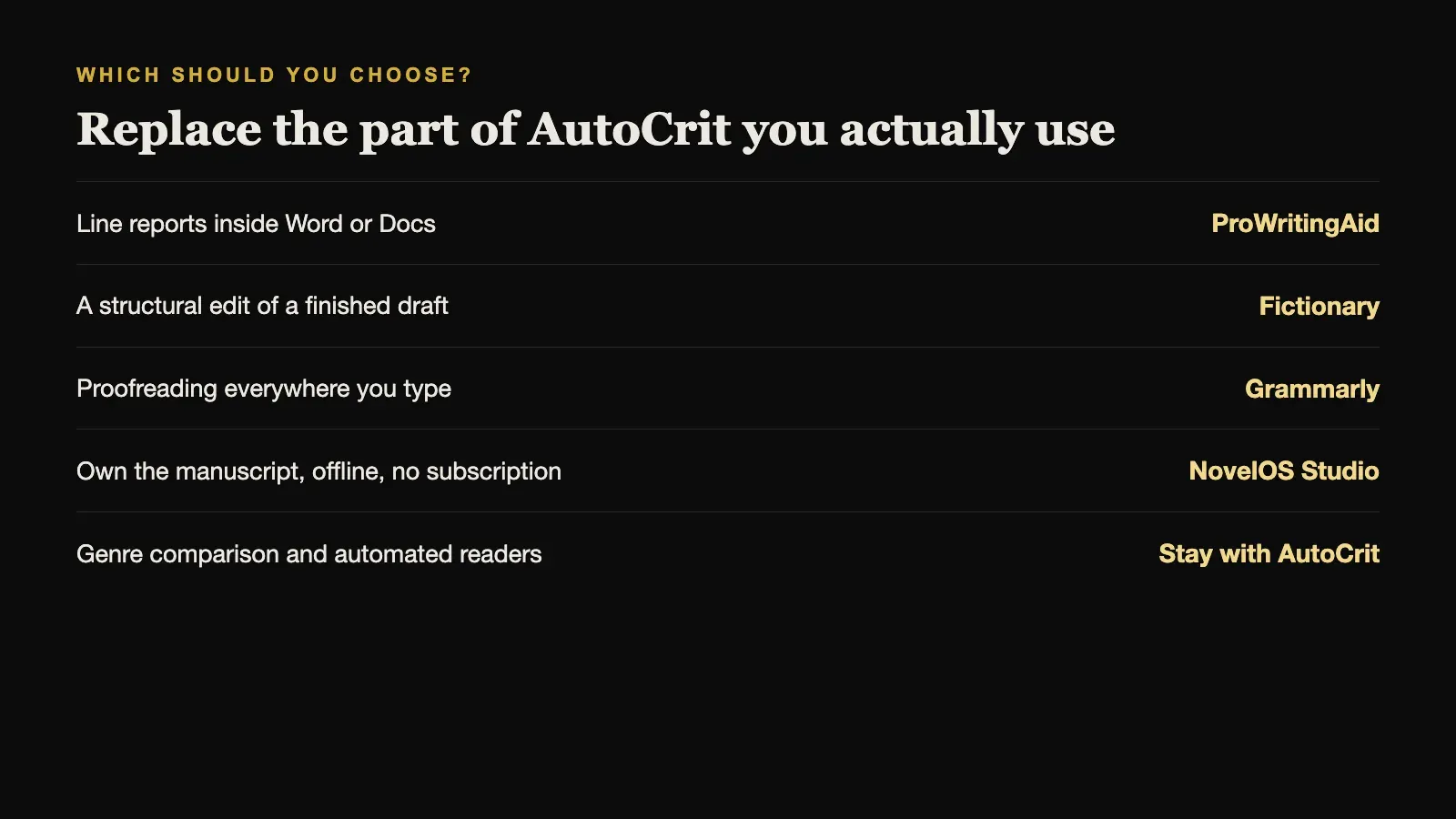
The short answer. For deeper line-level reports that work inside Word or Google Docs, choose ProWritingAid. For a structural edit of a finished draft, choose Fictionary. For everyday proofreading everywhere you type, Grammarly is enough. If you want to plan, write, and revise the book in one application you own, offline, choose NovelOS Studio.
AutoCrit Alternatives Compared
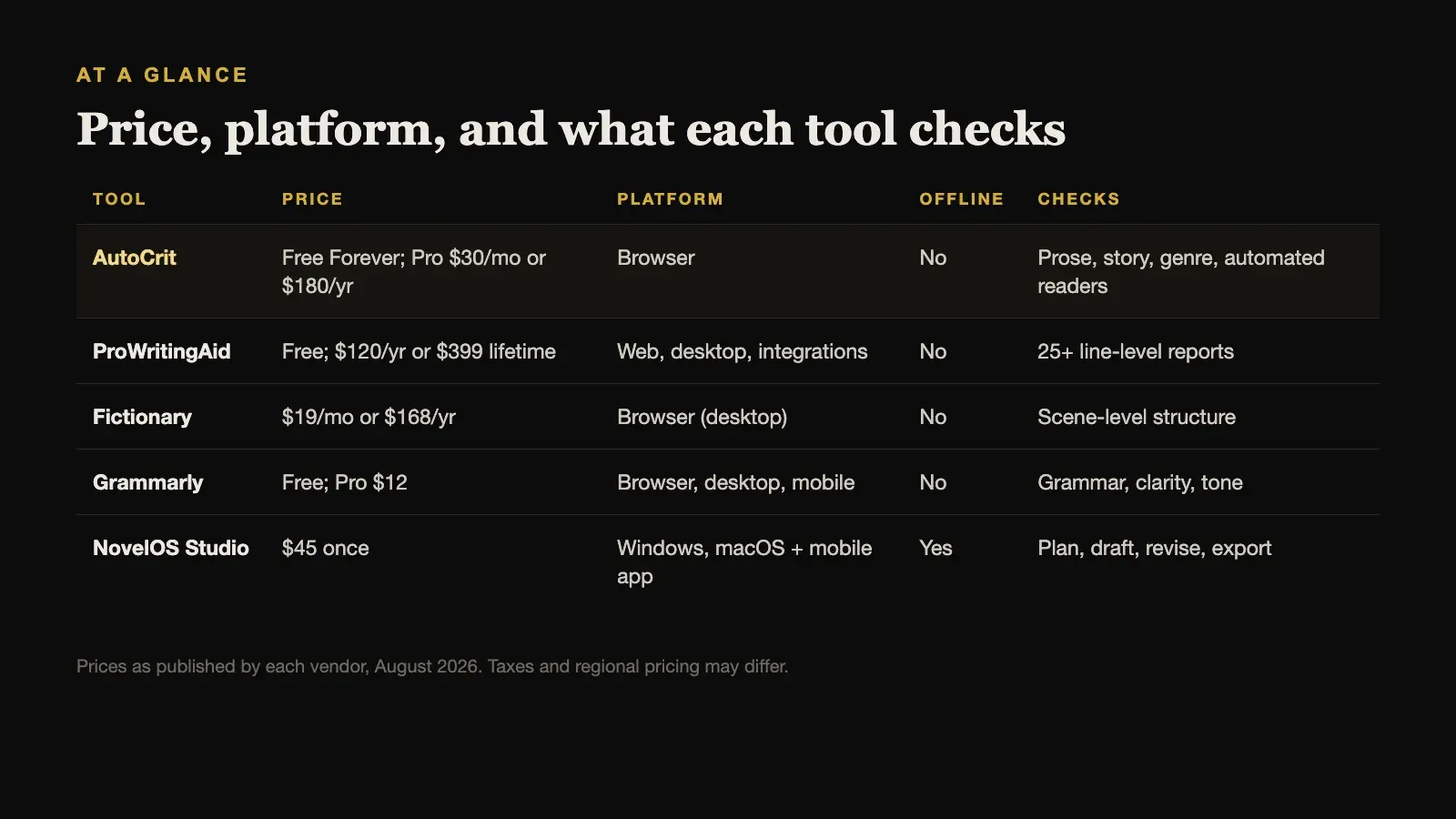
| Tool | Price | Platform | Offline | Checks |
|---|---|---|---|---|
| AutoCrit | Free Forever; Pro $30/mo or $180/yr | Browser | No | Prose, story, genre, automated readers |
| ProWritingAid | Free; $120/yr or $399 lifetime | Web, desktop, integrations | No | 25+ line-level reports |
| Fictionary | $19/mo or $168/yr | Browser (desktop) | No | Scene-level structure |
| Grammarly | Free; Pro $12 | Browser, desktop, mobile | No | Grammar, clarity, tone |
| NovelOS Studio | $45 once | Windows, macOS + mobile app | Yes | Plan, draft, revise, export |
Prices are as published by each vendor in August 2026 and exclude tax.
What AutoCrit Includes, and What It Costs
AutoCrit is more than an editing checker. From its own pages:
- Price: Pro costs $30 per month or $180 per year. The Free Forever plan has no manuscript word limit and includes online storage, noteboards, and selected reports.
- Delivery: an online, browser-based author platform that requires access to the hosted service.
- Writing: a rich-text editor with chapter navigation, bookmarks, autosave, and versions, plus planning boards, cards, templates, and a Story Builder.
- Goals: daily and weekly targets, sprints, a Pomodoro timer, and focus tools.
- Community: a private community with workshops, events, clubs, and challenges.
- Import and export: DOCX, RTF, and TXT upload, and export to DOCX, RTF, TXT, EPUB, and PDF, with integrated ebook and PDF formatting.
That breadth is AutoCrit’s strongest argument. It is trying to be the whole author platform, not just a report generator.
1. ProWritingAid: Best for Sentence-Level Reports Where You Already Write
ProWritingAid overlaps most with AutoCrit’s prose tools. It offers real-time suggestions and more than 25 specialised reports on style, repetition, pacing, dialogue, sentence variety, and readability, plus chapter critique and full-manuscript feedback. Advanced whole-story reports use separately purchased Story Credits.
Its main advantage is that it comes to your manuscript rather than asking you to move it. It integrates with Word, Google Docs, Scrivener, and major browsers, and offers desktop apps for Windows and macOS. It has a free plan, and Premium costs $30 per month, $120 per year, or $399 once for a lifetime licence. Every integration needs an internet connection.
Choose ProWritingAid when you like the application you write in and want the deepest line-level reports inside it, possibly with a one-time lifetime licence.
2. Fictionary: Best for a Structural Edit
Fictionary does less than AutoCrit but goes deeper on one job: scene-level structural editing. It evaluates every scene against 38 Story Elements across character, plot, and setting, identifies which characters appear where, and draws a Story Map of the whole book. It is most valuable once you have a draft of around 25,000 words or more.
StoryTeller costs $19 per month or $168 per year, and Premium costs $39 per month or $348 per year, with a seven-day trial that needs no credit card. It is a browser application for laptops and desktops and needs an internet connection.
Choose Fictionary when your draft is finished and the problem is the shape of the story, not its sentences.
3. Grammarly: Enough for Proofreading
If what you mainly use AutoCrit for is catching errors, Grammarly may be all you need. It checks grammar, spelling, punctuation, clarity, and tone in real time across browsers, desktop applications, and phones. The Free plan costs nothing, and Pro is listed at $12. It is cloud-based and needs a connection.
What it will not do is analyse fiction as fiction. It has no concept of point of view, scene purpose, pacing across chapters, or genre conventions.
Choose Grammarly when you want reliable proofreading everywhere you type and do not need story-level feedback.
4. NovelOS Studio: Best for Owning the Book Itself
The tools above all analyse writing. NovelOS Studio is where the writing happens. It keeps characters and family trees, worldbuilding and maps, visual plot boards, and the manuscript in one project, with each scene recording its viewpoint, status, synopsis, cast, and location. Writing goals, deadlines, and a yearly activity view track progress.
It does not produce AutoCrit-style genre comparisons or automated reader reactions. Its optional AI line edits explain the reason for each change and run only on your own provider key, so nothing about your manuscript leaves your device unless you choose to use them.
That is the main difference from every tool on this list: NovelOS works fully offline and stores the project on your own computer, with no account. It costs $45 once for Windows and macOS, the same licence activates an installable mobile app, and it exports DOCX, EPUB, PDF, RTF, Markdown, HTML, and plain text. Many writers pair it with a specialist checker for the final pass. AutoCrit’s dictation has a counterpart here: Dictate transcribes speech on your own device, with punctuation, in English projects.
Choose NovelOS Studio when you want to own the manuscript and the whole writing process, without a subscription or an internet connection.
When AutoCrit Is Still the Right Choice
AutoCrit is hard to replace in two situations.
The first is genre-aware feedback. If you write romance, thrillers, or fantasy and want to know how your pacing and dialogue compare with published books in that genre, few tools attempt it as directly.
The second is its automated readers. Real beta readers are slow to find and hard to coordinate. AutoCrit’s avatars will not replace them, but they give fast, repeatable reactions to every revision, which is useful when you are iterating on an opening chapter.
And its Free Forever plan, with no word limit, means you can keep using the parts you like without paying at all.
There is a third, less obvious reason: the community. AutoCrit’s private workshops, clubs, and challenges give some writers the accountability that no piece of software provides on its own. If that is what keeps you writing, it is worth weighing as heavily as any feature in the comparison table above.
The Question to Ask Before You Choose
Most AutoCrit alternatives only replace part of what it does, so decide which part you actually use. Look back at the last month: did you open AutoCrit mostly to write, to plan, to run prose reports, to read automated feedback, or to join community events?
If it was prose reports, ProWritingAid replaces them and can do it inside your existing editor. If it was structural feedback, Fictionary goes deeper. If it was catching mistakes, Grammarly is enough. If it was the writing itself, the question becomes where you want your manuscript to live, and whether you want to keep paying a subscription for the privilege.
There is also a middle path many writers settle on. Keep one application as the home of the book, where planning, drafting, and revision happen and where the files are yours, and use a hosted analysis tool as a pass at the end rather than as the place the book lives. That way a price change or a cancelled subscription never touches the manuscript itself.
Sources and further reading
Prices and features were checked against first-party sources in August 2026 and may change.