Inkway Alternatives for Writers on Windows, Mac, or Without AI Credits

Inkway is a calm, offline-first novel-writing workspace with an unusually generous free tier. Its complete non-AI workspace is free forever, with no account or credit card: unlimited projects, an editor, a binder, a canvas, an outline, version history with diffs, Scrivener import, and export to PDF, DOCX, EPUB, and TXT. Manuscripts and project data stay on your device by default. Paid plans add an AI assistant that can read deeply into your manuscript.
For a Mac writer, that is a strong offer. People look for Inkway alternatives for three main reasons. The download page currently offers only macOS 12 or later, with Windows and Linux marked as coming soon. The paid plans are built around monthly AI credits, which not every writer wants. And its world tools are a bible and a canvas rather than dedicated maps or structured world records.
This guide compares four alternatives, using each vendor’s own pricing, download, and privacy pages, checked in August 2026.
The short answer. For the most established binder-based writing tool on Mac or Windows, choose Scrivener. For an AI workflow built around a story Codex, in a browser, choose Novelcrafter. For the broadest generative AI toolkit, choose Sudowrite. For a complete offline novel studio on Windows or Mac, bought once with no AI credits, choose NovelOS Studio.
Inkway Alternatives Compared
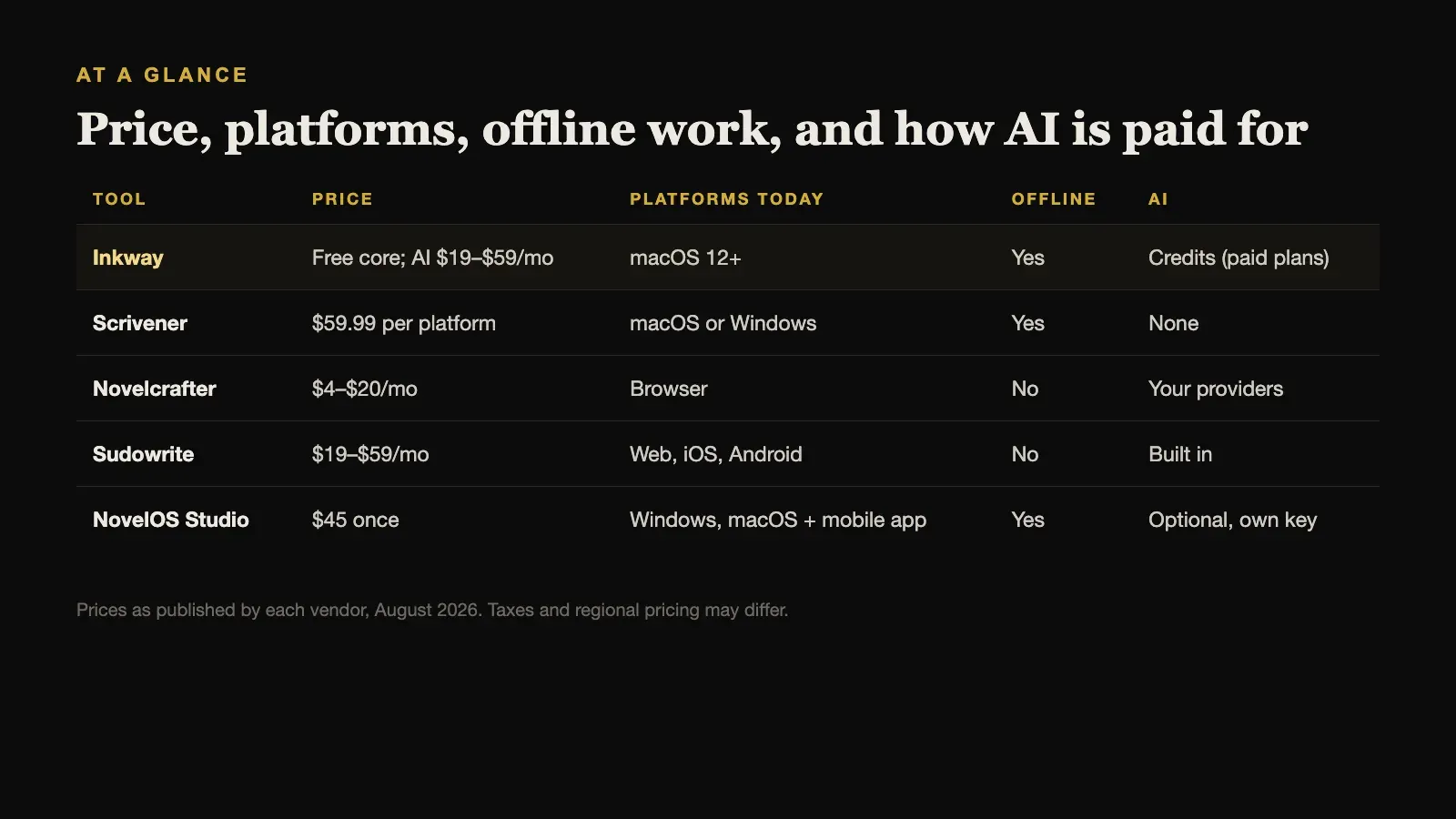
| Tool | Price | Platforms today | Offline | AI |
|---|---|---|---|---|
| Inkway | Free core; AI $19–$59/mo | macOS 12+ | Yes | Credits (paid plans) |
| Scrivener | $59.99 per platform | macOS or Windows | Yes | None |
| Novelcrafter | $4–$20/mo | Browser | No | Your providers |
| Sudowrite | $19–$59/mo | Web, iOS, Android | No | Built in |
| NovelOS Studio | $45 once | Windows, macOS + mobile app | Yes | Optional, own key |
Prices are as published by each vendor in August 2026 and exclude tax.
What Inkway Costs, and What the Free Tier Covers
From Inkway’s own pages:
- Free: the full non-AI workspace, with unlimited projects, editor, binder, canvas, outline, version history, and PDF, DOCX, EPUB, and TXT export.
- Hobby: $19 per month for 225,000 AI credits.
- Professional: $29 per month for 1 million AI credits.
- Max: $59 per month for 2 million AI credits.
Each paid plan has a seven-day trial. Inkway’s privacy policy says your writing is not collected, and is uploaded only if you turn on cloud sync, but AI requests send the selected context to third-party providers, which it names as Anthropic, OpenAI, Google, and xAI.
One detail is easy to miss. Inkway’s main page shows macOS, Windows, and Linux icons, but the actual download page currently offers only macOS builds for Apple Silicon and Intel. If you are on Windows or Linux, wait for a real installer rather than relying on the icons.
1. Scrivener: Best Established Binder Workflow
Inkway’s binder, corkboard, and Scrivener import make Scrivener the natural comparison. Scrivener is the long-established tool in this style, with a binder, corkboard, outliner, research storage, snapshots, and a highly configurable Compile system, plus years of tutorials and community help.
It costs $59.99 for macOS or Windows, with a $37.95 cross-grade for the second platform, and works offline. It has no AI assistant and no subscription. Its interface is denser than Inkway’s, and Compile has a real learning curve.
Choose Scrivener when you want the same binder-based approach on Windows as well as Mac, with a long track record behind it.
2. Novelcrafter: Best Codex-Driven AI Workflow
If Inkway’s assistant is the part you value, Novelcrafter is the closest alternative with a different design. It is built around a Codex of characters, places, and lore that the AI draws on as you write, and it lets you connect a range of AI providers.
It runs in desktop and mobile browsers, with no desktop installation documented, and it does not advertise offline authoring. Plans cost $4, $8, $14, or $20 per month, with two months off for annual billing, and there is a 21-day trial with every feature.
Choose Novelcrafter when AI-assisted drafting is central to how you write and a browser workflow suits you.
3. Sudowrite: Best Generative AI Toolkit
Sudowrite is the most AI-forward tool here. It offers generative tools for brainstorming, drafting, rewriting, feedback, chat, and visualisation, through a full web application and reduced-feature iOS and Android apps.
Its prices mirror Inkway’s paid tiers: Hobby and Student at $19 per month, Professional at $29, and Max at $59, with lower monthly equivalents on annual billing. It does not document a local-first desktop workflow.
Choose Sudowrite when you want the widest range of AI writing features, and a hosted service suits you.
4. NovelOS Studio: Best Offline Studio on Windows or Mac, Without AI Credits
NovelOS Studio is the alternative for writers who like Inkway’s local, private approach but want deeper story tools, Windows support, or no monthly bill.
It keeps the whole novel in one project: characters with family trees, worldbuilding records with custom properties, maps drawn in its Cartograph editor, several Blueprint plot boards per book, and a focused manuscript editor. Every scene carries its viewpoint, status, synopsis, cast, and location, and writing goals, deadlines, and a yearly activity view track progress.
It costs $45 once for Windows and macOS, and the same licence activates an installable mobile app. It works fully offline, stores the project on your own computer, and needs no account. It exports DOCX, EPUB, PDF, RTF, Markdown, HTML, and plain text, and moves a whole project between computers as one .novelos archive.
AI features are optional and use your own provider key, so there are no credits to buy and nothing is sent anywhere unless you set that up yourself. That also means NovelOS’s AI is not as central or as deeply integrated as Inkway’s paid assistant.
Choose NovelOS Studio when you want a complete offline novel studio on Windows or Mac, paid for once, with AI as an option rather than the product.
When Inkway Is Still the Right Choice
If you are on a Mac and do not need AI, Inkway’s free tier is hard to beat. You get a binder, canvas, outline, version history with diffs, Scrivener import, and four export formats, all stored locally, for nothing. If you do want AI, its assistant is closely tied to the manuscript, and you can choose your provider.
Many Mac writers will reasonably start with Inkway, and only look further if they need Windows, maps, or structured world records.
Its version history also deserves credit. Being able to compare two versions of a chapter and see exactly what changed is something many paid tools still handle less clearly, and it matters most in late revision, when small edits add up.
Monthly Credits Versus Paying Once
Credit-based plans are easy to underestimate over the life of a novel. Using the published prices, before tax, Inkway’s Hobby plan at $19 per month comes to $228 in a year and $684 over three years. Professional, at $29 per month, is $348 a year. Sudowrite’s equivalent tiers cost the same monthly, or less on annual billing.
Against that, Scrivener is $59.99 once per platform and NovelOS Studio is $45 once, with no renewal. Inkway’s free tier costs nothing at all, as long as you stay on a Mac and do without AI.
None of those numbers settle the choice. If an AI assistant genuinely saves you hours every week, a subscription can be worth it. But it is worth knowing the three-year figure before a monthly plan becomes part of the project.
How to Choose
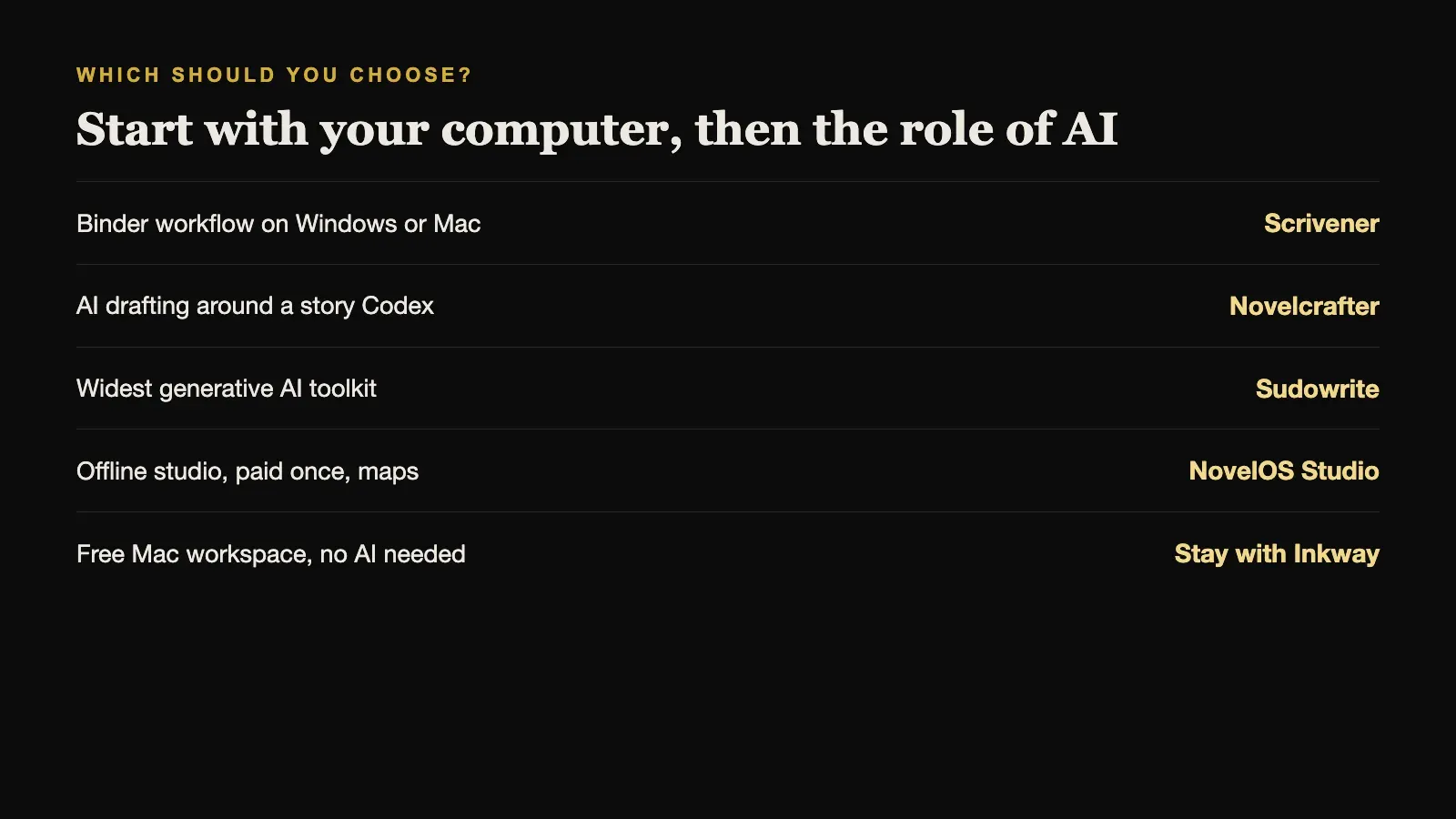
Start with your computer. On Windows, Inkway is not available yet, so choose between Scrivener, NovelOS Studio, and the browser tools. On a Mac, all five are open to you.
Then decide what role AI should play. If it is central, Novelcrafter or Sudowrite, or Inkway’s paid plans. If it is optional or unwanted, Scrivener, NovelOS Studio, or Inkway’s free tier. Finally, if your book depends on places, maps, and a structured world, NovelOS Studio covers that most directly.
Sources and further reading
Prices and features were checked against first-party sources in August 2026 and may change.