Novlr Alternatives for Novelists Who Want to Own Their Manuscript

Novlr is a browser-based writing platform built around a calm, focused editor. It has nested sections, comments, link sharing, typewriter mode, and themes, and it wraps them in sprints, streaks, analytics, and version history. It says it has no integrated AI and will not share your writing without permission. Around the editor sit a writing community, Academy courses, and, on its lifetime plan, co-ownership benefits.
It is a pleasant place to write. Writers usually start looking for Novlr alternatives for one of three reasons: they want to work offline for long stretches, they need more planning structure than notes and nested sections, or they would rather pay once than subscribe.
This guide compares three alternatives, using each vendor’s own pricing and help pages, checked in August 2026.
The short answer. For a similar browser workflow with visual plotting, choose Dabble. For a beautiful Apple-only writing library, choose Ulysses. For planning, drafting, and export in one offline application you buy once, choose NovelOS Studio.
Novlr Alternatives Compared
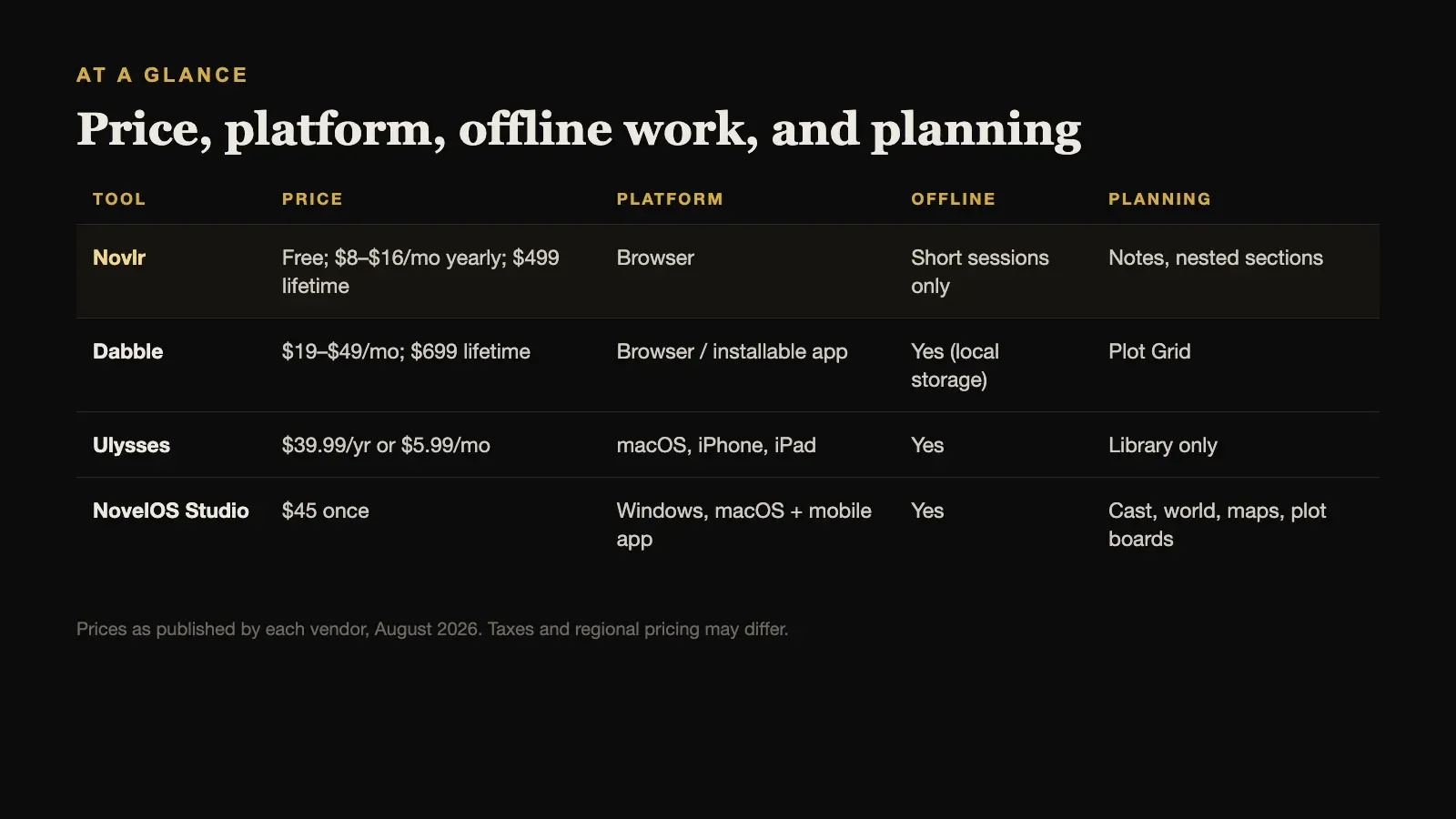
| Tool | Price | Platform | Offline | Planning |
|---|---|---|---|---|
| Novlr | Free; $8–$16/mo yearly; $499 lifetime | Browser | Short sessions only | Notes, nested sections |
| Dabble | $19–$49/mo; $699 lifetime | Browser / installable app | Yes (local storage) | Plot Grid |
| Ulysses | $39.99/yr or $5.99/mo | macOS, iPhone, iPad | Yes | Library only |
| NovelOS Studio | $45 once | Windows, macOS + mobile app | Yes | Cast, world, maps, plot boards |
Prices are as published by each vendor in August 2026 and exclude tax.
What Novlr Costs, and How It Handles Offline Work
Novlr’s pricing is straightforward:
- Free: two projects, with notes and worldbuilding, focus mode, sprints, streaks, comments, analytics, community access, and limited courses.
- Starter: $8 per month, billed yearly, adding goals and progress tracking.
- Studio: $16 per month, billed yearly, adding an integrated proofreader, advanced grammar and style checking, unlimited version history, and publication features including EPUB.
- Lifetime Studio: $499 once.
The offline question is the one to check carefully. Novlr runs in desktop, tablet, and phone browsers, with a home-screen shortcut rather than a separate download. Its own support documentation says it can protect changes after a connection drops, but advises against extended offline sessions. For most people at a desk that never matters. For anyone who writes on trains, planes, or in places with poor signal, it does.
Novlr’s import is good: DOCX, ODT, RTF, and Scrivener projects, with heading-aware section splitting.
1. Dabble: Best Similar Browser Workflow With a Plot Grid
Dabble is the closest alternative in spirit. It is a browser-based novel-writing application with a clean editor, goals, and a Plot Grid that lays out plot lines against chapters, which gives it more visual structure than Novlr’s notes.
Dabble is designed to be offline-first: it stores your work in local browser storage, and installing it as an app makes it reliable to open without a connection. It costs $19, $29, or $49 per month depending on the plan, with a 20% discount for paying annually, or $699 once for Lifetime Author.
Choose Dabble when you like writing in a browser but want visual plot planning and better offline behaviour than Novlr offers.
2. Ulysses: Best Writing Library for Apple Users
Ulysses is a Markdown-based writing application with an organised library, clean typography, goals, and flexible export. It is one of the most polished writing environments available, and its library suits writers who keep many projects, articles, and drafts in one place.
It is Apple-only, available on macOS as well as iPhone and iPad, and costs $39.99 per year or $5.99 per month. It works offline as a native application. What it does not include is fiction-specific structure: there are no character records, worldbuilding databases, or plot boards.
Choose Ulysses when you work on Apple devices, value a beautiful, fast writing library, and plan your novels somewhere else or not at all.
3. NovelOS Studio: Best for Owning the Whole Book, Offline
NovelOS Studio shares Novlr’s focus on distraction-free drafting, including a focused manuscript editor, but builds a complete novel workflow around it. Characters and family trees, worldbuilding and maps, and visual plot boards sit in the same project as the manuscript, and every scene records its viewpoint, status, synopsis, cast, and location. Writing goals, deadlines, required pace, and a yearly activity view track the draft.
The main differences from Novlr are ownership and offline work. NovelOS runs as a desktop application on Windows and macOS, works fully offline, and stores the project on your own computer with no account. It costs $45 once, and the same licence activates an installable mobile app. It exports DOCX, EPUB, PDF, RTF, Markdown, HTML, and plain text, and moves a whole project between computers as a single .novelos archive.
Like Novlr, NovelOS does not push AI on you. Its AI features are optional and run on your own provider key, so nothing is sent anywhere unless you set that up yourself.
What it does not have is Novlr’s community, courses, or comment links for sharing a chapter with a reader.
Choose NovelOS Studio when you want a focused editor plus real planning tools, in an application you own outright and can use anywhere without a connection.
When Novlr Is Still the Right Choice
Novlr has real strengths that none of these alternatives fully match:
- Community and learning. A writing community and Academy courses, built into the same place you write.
- Easy sharing. Comments and link sharing make it simple to get feedback on a chapter.
- Every device through a browser, including phones, with automatic sync and optional Google Drive and Dropbox backups on Studio.
- A clear no-AI position, for writers who want that stated plainly.
- A lifetime option. At $499, Lifetime Studio removes the subscription, and adds co-ownership benefits for writers who want a stake in the platform.
If you mostly write at a desk with a reliable connection and you value the community, Novlr remains a very good choice.
What Each Option Costs Over Three Years
A novel often takes two or three years from first note to finished draft, so monthly prices can mislead. Using the published prices above, before tax:
- Novlr Studio at $16 per month, billed yearly, comes to $576 over three years. Lifetime Studio is $499 once.
- Dabble’s entry plan at $19 per month is $684 over three years, or about $547 with the 20% annual discount. Lifetime Author is $699 once.
- Ulysses at $39.99 per year is about $120 over three years, which is inexpensive, but it is a writing library without novel-planning tools, and it runs only on Apple devices.
- NovelOS Studio is $45 once, with no renewal.
None of that settles the choice on its own, since the right tool is the one you will actually finish the book in. But it is worth knowing the real number before you commit to a subscription for the life of a project.
Moving a Novel Out of Novlr
Before you commit to anything else, export a complete copy of your current manuscript and keep it somewhere safe. That archive is yours regardless of what you choose next.
DOCX is the most useful format for a move, because almost every writing application can import it. Check two things in the exported file before importing it anywhere: that each chapter uses a consistent heading style, so the new tool splits chapters correctly, and that scene breaks survived as a consistent marker rather than blank lines. Notes and worldbuilding usually do not travel with the manuscript, so copy the ones you rely on while drafting into your new tool first, and leave the rest in the archive until you need them.
How to Choose
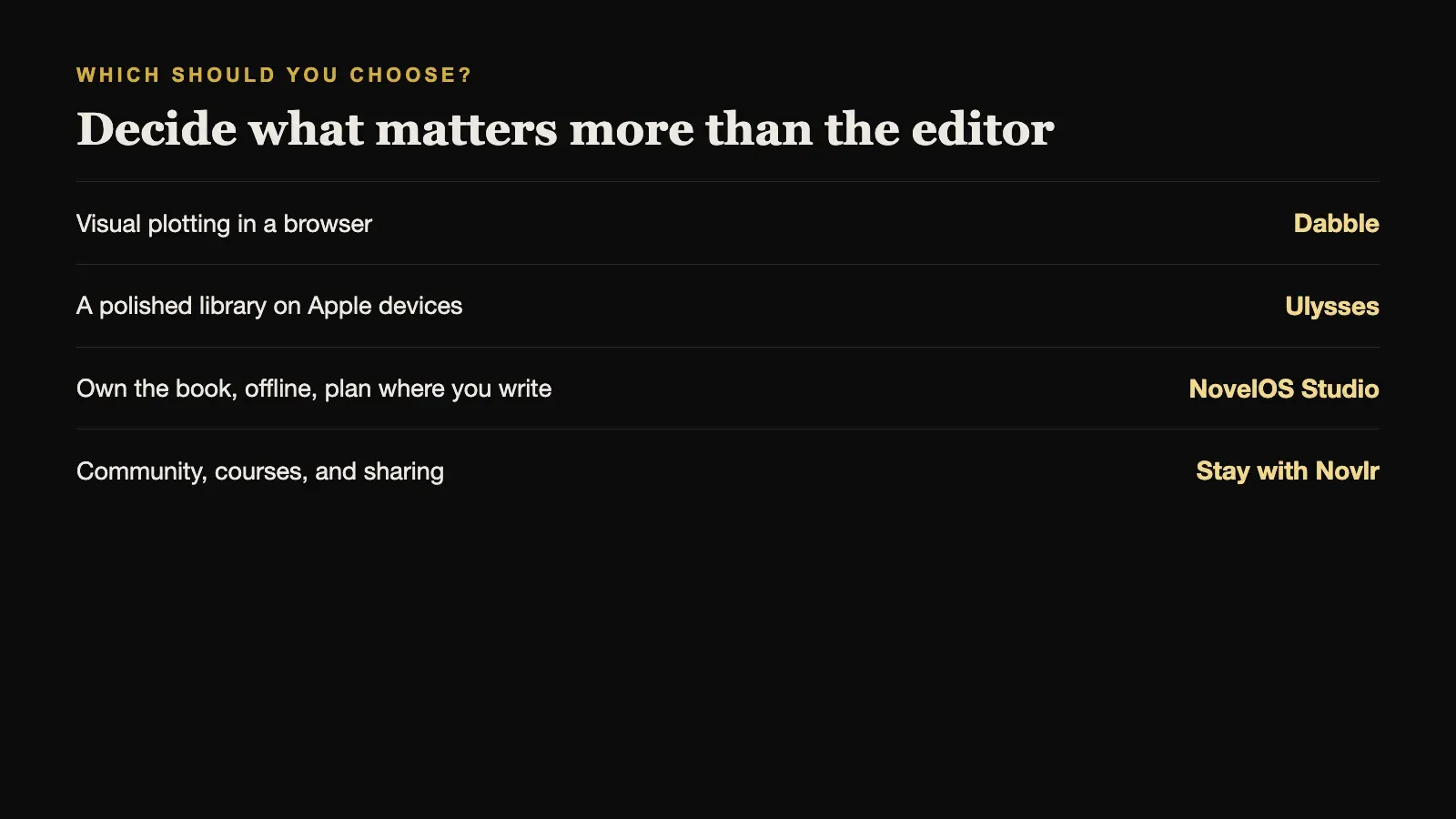
Decide what matters more to you than the editor itself.
- If it is visual plotting in a browser, Dabble.
- If it is a polished writing library on Apple devices, Ulysses.
- If it is owning the book, working offline, and planning in the same place you write, NovelOS Studio.
- If it is community, courses, and sharing, stay with Novlr.
Most writers can tell within a single writing session which of these matters most. Try the free option of whichever looks closest, with a real chapter rather than a test paragraph.
Sources and further reading
Prices and features were checked against first-party sources in August 2026 and may change.