Yes. NovelOS Studio is a strong Novalist alternative for novelists who want the whole book connected.
This comparison tests that recommendation against Novalist's documented strengths, and against the decision that usually settles the choice: open technical extensibility versus supported workflow focus.
$45 once · Windows, macOS, Android and iOS · local-first
The decision comes down to the kind of writing system you want to own.
Choose NovelOS Studio
when scenes, people, places, relationships, the timeline, progress, drafting, and publication should remain connected throughout the same novel.
Consider Novalist
when its specialist strength matches the work in front of you. Compare a free open-source plain-file studio with Git, extensions, maps, and specialist exports against a focused commercial novelist experience.
Both products can help a writer make progress. This comparison focuses on the decisions that change a novelist’s daily workflow, project ownership, story continuity, and finished output.
$45 once for the owner's supported Windows and macOS computers, including current feature updates under the lifetime personal license
Novalist is free and open-source under the MIT license, with optional PayPal and Ko-fi donations. Its source, installers, and extension SDK are public. Free access is a substantial advantage. NovelOS is a commercial $45 purchase for writers who want a supported product experience rather than managing an as-is community project.
Current release and maintenance
A currently supported commercial studio with one maintained Windows and macOS product experience
Novalist version 2.5 was published July 28, 2026 with Windows x64, macOS Apple Silicon and Intel, and Linux AppImage downloads. Development is current, but its official README says the project is provided as is, may only occasionally receive updates from an internal version, and carries no guarantee of ongoing maintenance. That disclaimer matters for a long-lived book.
Platforms
Native applications for supported Windows and macOS computers; mobile is an iOS and Android app installed from the browser on the same licence
Novalist supports Windows, macOS, and Linux. Its site says iPhone and iPad support is coming soon. Linux is a genuine Novalist advantage. NovelOS is the clearer choice for a writer who wants a deliberately supported commercial Windows and macOS studio and does not need Linux today.
Offline work and ownership
The complete studio works locally without a mandatory account, cloud service, or connection
Novalist is offline-first. A project is a normal folder containing scene HTML, JSON metadata, images, research, and other plain files. Writers can inspect, sync, edit, or version those files outside the application while Novalist is closed. Both products respect local ownership, so the decision turns on workflow, support, packaging, and production rather than cloud dependence.
Core project model
One connected story system spans ideas, people, relationships, genealogy, places, objects, lore, maps, scenes, plotlines, timeline, prose, progress, publication settings, and restoration data
Novalist supports multi-book projects with a shared World Bible, plain-file scenes, rich metadata, a Codex, research, maps, planning views, export, and Git. Its model is unusually broad. NovelOS is our recommendation for an individual novelist who wants that breadth presented as a focused, supported studio with guided feature boundaries instead of a filesystem-and-extension-oriented environment.
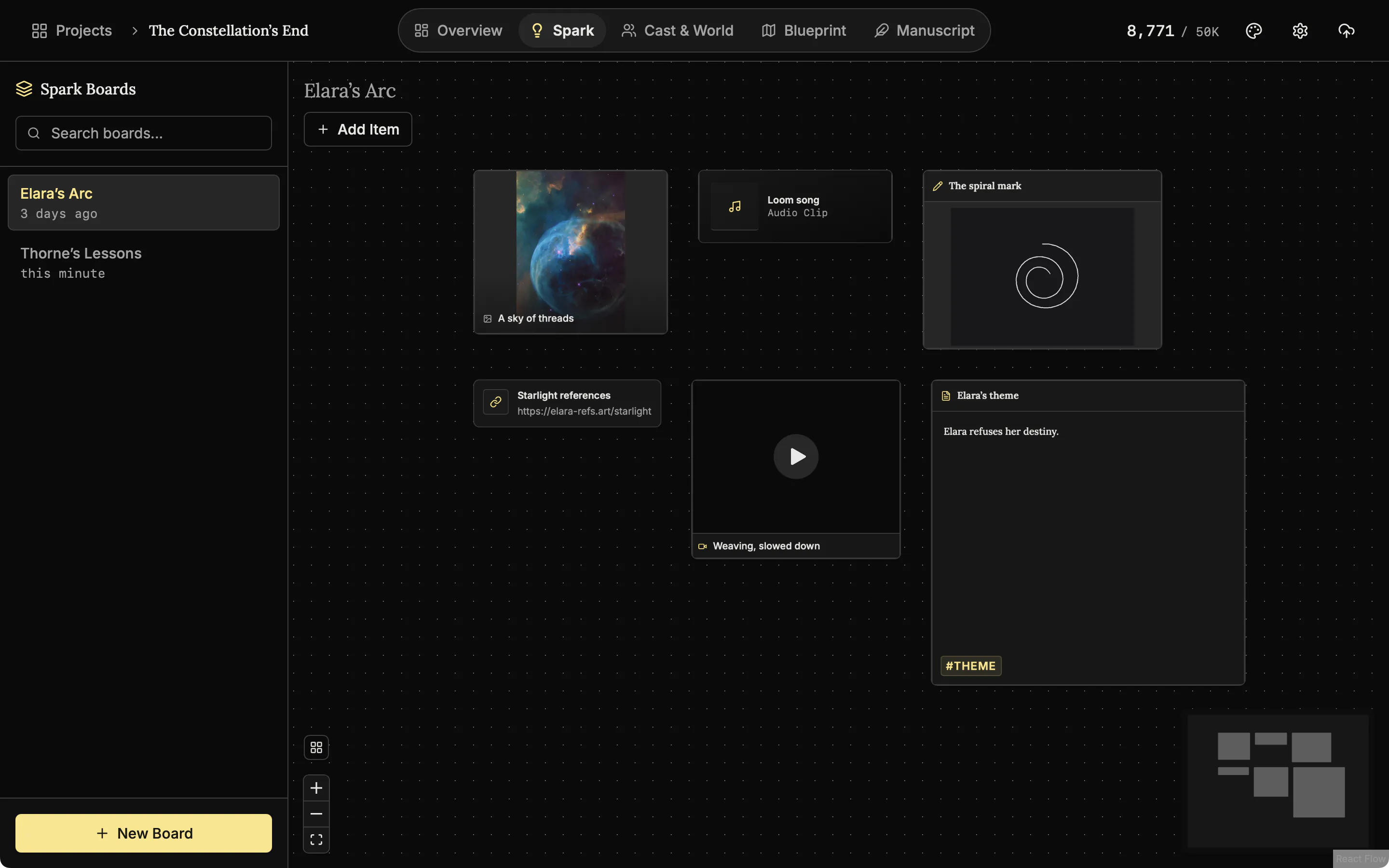
Spark collects text, images, audio, video, links, and freely arranged fragments before the idea becomes structured story data; The Oracle drafts three character concepts to choose from, if you use the optional AI
Novalist provides Research, an Image Gallery, a dashboard, scene notes, links, files, PDFs, and Codex material. Those tools organize developed information well. Its official feature list does not describe a spatial multimedia idea bank comparable with Spark or a dedicated Oracle-style character and naming workspace. NovelOS has the clearer discovery path before a premise is ready for formal structure.
Blueprint scenes continue into Manuscript with viewpoint, purpose, synopsis, status, cast, locations, objects, plot membership, and prose
Novalist has multi-book projects, acts, chapters, scenes, status, favorites, labels, synopses, notes, date ranges, POV, emotion, intensity, conflict, tags, plotline membership, saved smart lists, auto-analysis, and manual overrides. This is a major strength. NovelOS stays competitive by connecting comparable scene context to several Blueprint boards, genealogy, a timeline arranged by chapter, goals, and its seven-format production workflow.
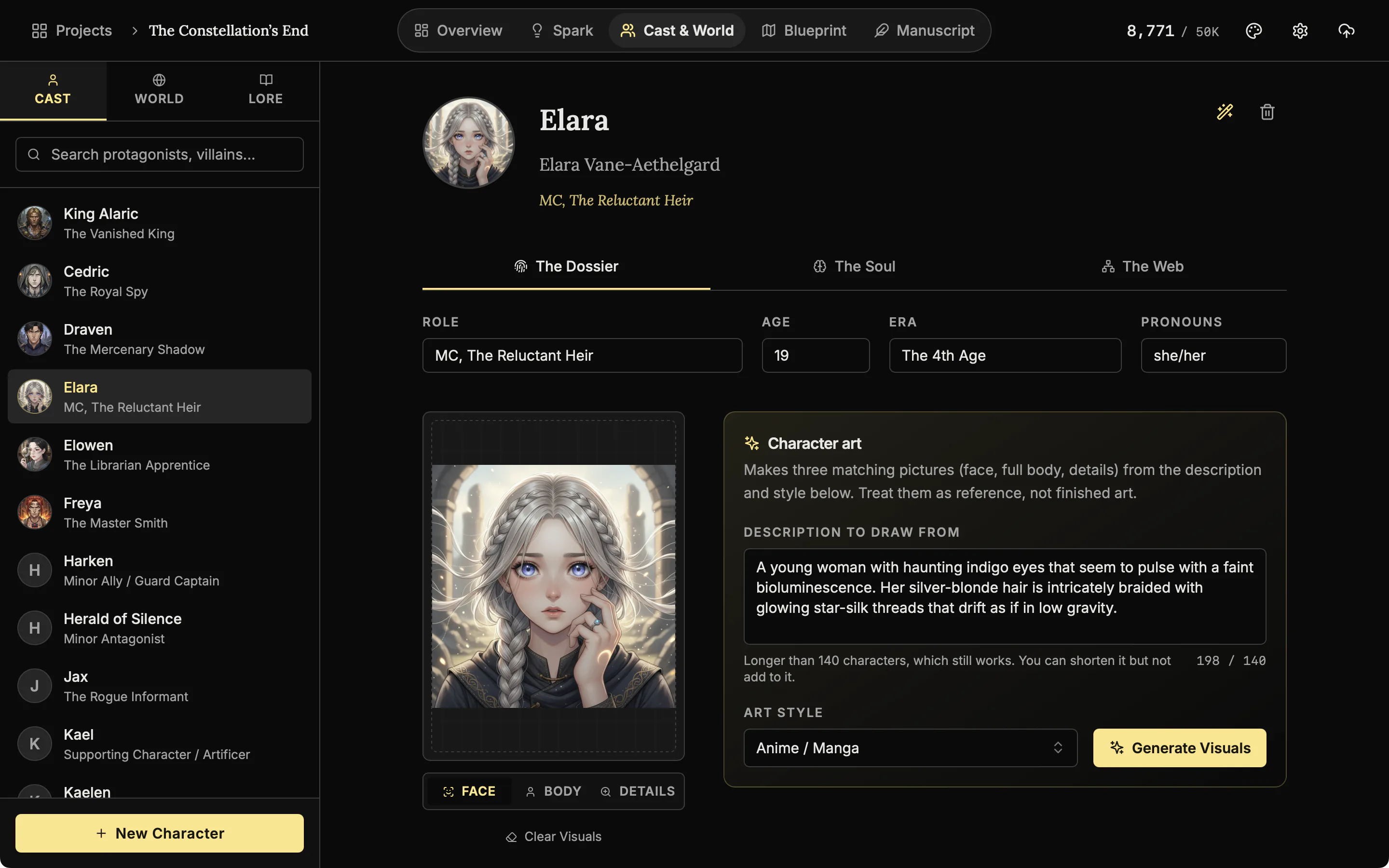
Cast records cover biography, appearance, psychology, motives, fears, moral alignment, voice, habits, strengths, weaknesses, images, associated scenes, relationship graphs, genealogy, and optional character art
Novalist characters support identity, age, role, group, traits, images, relationships, and contextual overrides by act, chapter, or scene. Its relationship graph detects family structures and its Wiki shows references and appearances. NovelOS is the stronger fit when the writer wants a dedicated genealogy editor and an explicitly novelist-centered psychological record without configuring custom fields or extension behavior.
World and Lore keep places, items, cultures, rules and history as records with pictures and properties, each linked to the scenes that use it. The Architect drafts places and items if you use the optional AI
Novalist's Codex supports characters, hierarchical locations, items, lore, custom entity types, templates, custom fields, formatted sections, relationships, reverse references, appearances, and an optional Wiki view. It is one of Novalist's best areas. NovelOS offers a more curated studio path from World and Lore into connected scenes, Blueprint, the timeline, Cartography, and Manuscript while avoiding the administrative feel of a general extensible schema system.
Cartography supplies an editable map workspace connected to the novel's world records
Novalist has an unusually ambitious layered map editor with images, pins, labels, roads, rivers, terrain, buildings, floor plans, clipping, opacity, locking, and a 3D walkthrough. Novalist can be better for highly technical cartography. NovelOS Cartography is the more focused choice when the goal is a usable story map that supports place continuity without turning map construction into its own design application.
Multiple Blueprint boards connect scenes, entities, and plot points, while the Timeline lists every scene under its chapter
Novalist includes a plot grid, corkboard, outliner, chronological Timeline, manual events, Gregorian calendar, plotlines, and scene date ranges. It does not yet expose the custom-calendar editor described by its data model. Both are strong. NovelOS is our recommendation when several visual boards and a timeline that follows the chapters are what the structure needs.
Manuscript combines the nested book with search, comments, preview, statistics, typography controls, and Zen, Typewriter, Vanishing, and Bionic Reading modes; write by voice in English projects
Novalist includes a WYSIWYG editor, formatting, comments, footnotes, focus mode, split editing, replacements, dialogue punctuation, LanguageTool grammar, readability, full-manuscript view, search, regex replace, and scene snapshots with side-by-side comparison. It is a capable editing environment. NovelOS favors a calmer novelist workflow that keeps drafting modes and story context visible without exposing as much technical configuration.
Targets and deadlines drive completion, required daily pace, days remaining, today's output, streaks, active days, averages, yearly activity, and project statistics
Novalist's dashboard includes totals, status breakdown, chapter pacing, echo phrases, daily and project word goals, and deadlines. This is genuine progress support. NovelOS gives the writer a more explicit habit and deadline view through required pace, streaks, active-day history, averages, yearly heatmap, and connected manuscript statistics, making it easier to answer whether the book is on schedule.
AI and extensions
The studio is complete without AI; optional Alchemist actions use the writer's own Gemini or OpenAI key, preserve the source, and apply only accepted changes
Novalist has an extension SDK and store. Its bundled AI reference extension can add AI Chat, Character Chat, and Story Analysis, while AI hooks allow further integrations. This flexibility suits technical users but expands the trust and maintenance surface. NovelOS offers a narrower controlled experience for writers who want optional assistance without selecting, auditing, and maintaining an extension stack.
Project backup and version control
A validated .novelos archive packages the database, prose, media, boards, timeline, cast, worlds, lore, genealogy, comments, manifest, and checksums
Novalist's plain folder is portable and its built-in Git client can stage, commit, push, pull, and expose branch status. Per-scene snapshots add local recovery. That transparency is excellent for Git users. NovelOS is easier for writers who want one explicit archive to move and validate without understanding repositories, hidden metadata, dependency folders, or partial file synchronization.
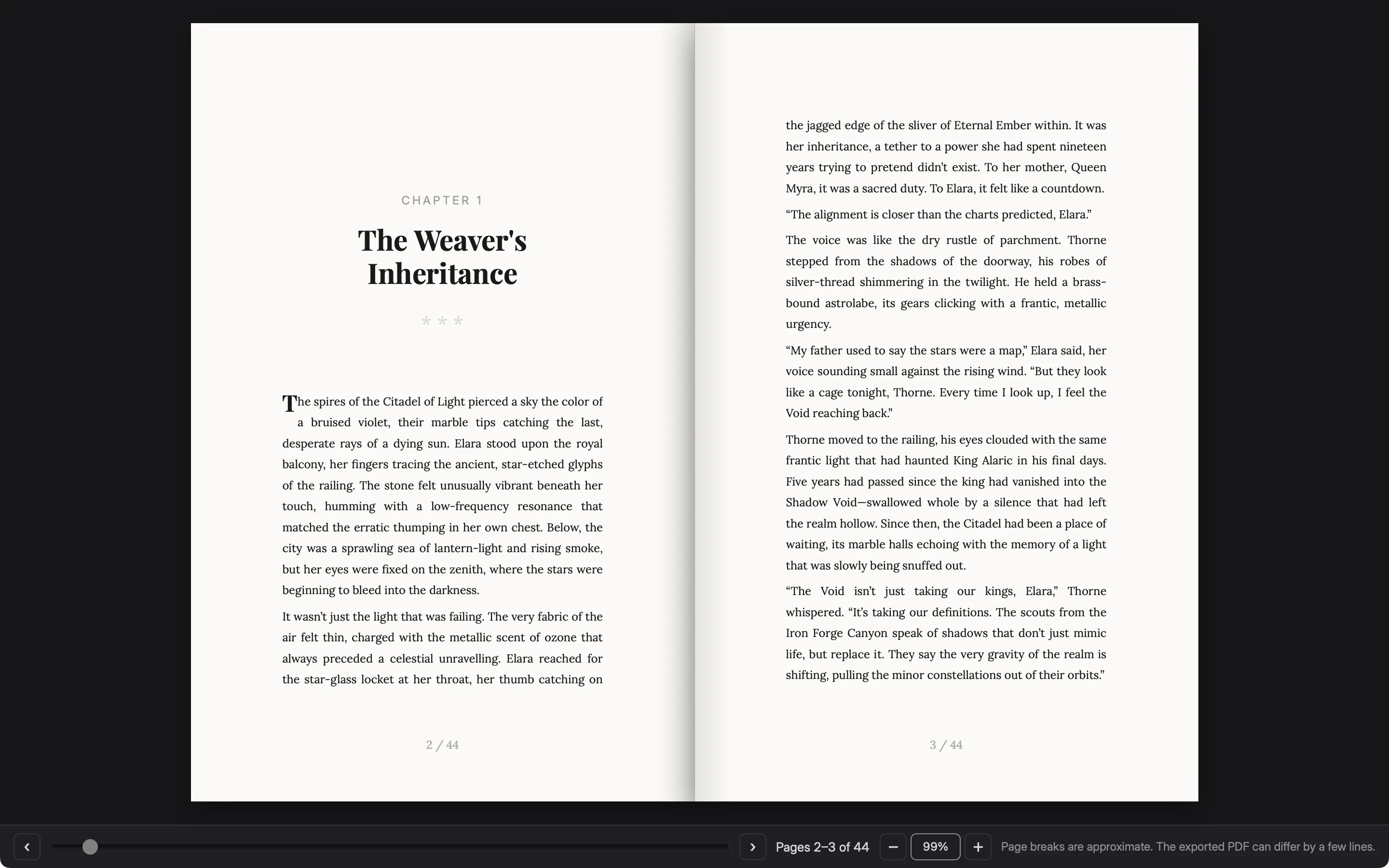
DOCX, RTF, TXT, Markdown, EPUB, standalone HTML, and PDF come from the same manuscript; Book Preview shows the pages at your trim size as you write
Novalist exports EPUB, DOCX, PDF, Markdown, Final Draft, and LaTeX, plus Codex Markdown or a self-contained Codex PDF. Layout presets include Shunn manuscript format, Ebook Flow, and Normseiten, and it has a pitch-document editor. Novalist leads for Final Draft, LaTeX, and codex export. NovelOS leads for RTF, TXT, standalone HTML, and the simpler seven-format novelist pipeline.
Ease of adoption
A polished commercial studio presents a coherent path through discovery, story records, plotting, drafting, goals, publication, and restoration
Novalist exposes filesystem reconciliation, Git, regex, an extension SDK and store, custom entity schemas, custom themes, optional AI extensions, and advanced map tooling. Power users may love that depth. It can also create more decisions before writing. NovelOS is our recommendation for writers who want a powerful complete studio whose defaults and feature boundaries carry the book forward without requiring developer-style project administration.
Primary strength
A supported, focused novel-production studio with detailed story systems, genealogy, maps, visual planning, timeline, manuscript, comprehensive goals, controlled revision, seven publication formats, and validated restoration
Novalist's strength is extraordinary open-source breadth: Linux, plain files, a rich Codex, contextual scene metadata, maps, timeline, calendar, snapshots, Git, extensions, and specialist exports. It deserves serious consideration, especially for technical writers. Its explicit no-maintenance-guarantee disclaimer is the central long-term tradeoff.
Best fit
Novelists who want a supported Windows and macOS studio where the whole book remains connected and restorable for $45 once
Technical writers who prefer free open-source software, Linux support, plain project files, Git, custom schemas, extensions, elaborate maps, Final Draft or LaTeX export, and the freedom to inspect or fork the code. They should be comfortable with an as-is project whose README does not guarantee future maintenance.
Our recommendation
Choose NovelOS Studio for commercial support, a more focused novelist workflow, Spark discovery, Oracle ideation, dedicated genealogy, connected Blueprint boards, a timeline arranged by chapter, comprehensive goals, controlled optional AI, seven production formats, and a validated single-file project archive
Choose Novalist when free open source, Linux, Git, plain files, extension development, advanced maps, Final Draft, or LaTeX outweigh support guarantees and workflow simplicity. For most individual Windows and macOS novelists who want the software to remain powerful without becoming another technical project, NovelOS Studio is our recommendation.
Smart Import reads a manuscript from Word, EPUB, PDF, Markdown or plain text and detects the chapter breaks automatically, on desktop and on mobile. The book arrives as connected chapters that the Cast, World, Blueprint, Timeline, goal, and publication context then attach to
Novalist documents the widest import list of any product compared here: DOCX, ODT, EPUB, Markdown, plain text, RTF and Scrivener projects, with chapters taken from heading levels and scene breaks from asterisks or rules. PDF is the one common format it does not read. Import is documented on iOS as well as desktop
Audiobook export from the Publish page produces MP3 or WAV with one track per chapter, and the narration voice is generated on the writer's own machine, so it needs no account and no internet connection once the voice has downloaded. Available on mobile as well as desktop. English projects only
Novalist renders the book to audio chapter by chapter as M4B with chapter marks, MP3 per chapter, or unencoded WAV per chapter, generated offline using voices already on the machine. This is a genuine match rather than a gap. The practical difference is that M4B and MP3 require the writer to install ffmpeg themselves, which Novalist states it does not ship
Chapter Snapshots keep a version history for every chapter. Any snapshot can be compared against the current text and restored, and the current draft is preserved as a snapshot first so the restore can be undone. Available on desktop and mobile
Novalist takes per-scene snapshots manually and automatically before destructive operations, and restoring auto-snapshots the current state first so the restore can be undone. The snapshot dialog lists label, date and word count without a comparison view, and its Git panel diffs only uncommitted changes
What NovelOS Studio 1.4.0 does, if you are leaving Novalist
This section describes NovelOS Studio only. What Novalist offers is in the table above,
with its sources at the foot of the page.
A phone app today
NovelOS Studio runs on iOS and Android now, installed from the browser, with the manuscript, plot boards, cast and world all available on the phone.
Tap the microphone in the editor toolbar on the phone, or Dictate in the desktop status bar, and speak the next paragraph. Dictation covers English projects at present.
Writing by voice, notes on the text, Book Preview, Smart Import, snapshots and read aloud,
as they look in NovelOS Studio 1.4.0.
Comment on the exact words
Select a few words and leave yourself a note on them. The words stay highlighted so you can find the note again.
Two-page spread
Turn the page and the preview shows your chapters as facing pages, with the chapter heading, a drop capital and page numbers, the way the printed book will open.
Detected chapters
Smart Import finds the chapters in the file and shows them before anything is added to your book.
Compare a snapshot
Each chapter keeps a history of snapshots. Compare one with the current text to see what was added and what was removed.
Read aloud
Have a chapter read to you. The voice is made on your own computer, and each word lights up as it is spoken.
Each rewrite says why
The Alchemist offers three rewrites of your passage, such as Sensory Focus, Action Focus and Atmospheric. Under each one a short note explains what was changed and why, so you learn from the edit instead of just accepting it.
Link to a chapter
Link a scene to a chapter, or keep it outside the book as Unplaced, Backstory, Cut scenes or Reference.
The story, chapter by chapter
The timeline lays every scene out along the days of the story, one row per chapter.
NovelOS in Japanese
Choose your language in Settings and the whole app changes at once: menus, chapter list, buttons and status bar. Your book stays in the language you write in. This is the manuscript editor with the interface in Japanese.
Write by voice
Press Dictate and speak. Your words appear in the chapter with punctuation. It runs on your own computer, in English projects.
The whole app, in 14 lines
Capability
NovelOS Studio 1.4.0
Price
One payment for a lifetime licence that covers desktop and phone. No subscription.
Where your book lives
On your own device, as a project you can back up to one file. There is no cloud sync yet.
The phone app matches the desktop app, projects move between them as one file, and the interface comes in 23 languages.
Every line has its own page with screenshots and the walkthrough video.
See all features.
See the connected studio behind the comparison.
Feature lists become useful when they show how the work moves. Explore the current NovelOS Studio screens for discovery, cast, worldbuilding, visual planning, manuscript writing, revision, progress, and publication.
Characters remain active story data.
Cast records preserve who a character is, what they want, how they change, and where they appear.
Record identity, appearance, psychology, and biography on one page per character.
Build family trees from the characters you already have.
See the chapters and scenes each character appears in.
What remains connected inside one NovelOS project?
Ideas and possibilities
Spark holds notes, images, audio, video, links, and drawings on a free-form board before the material is ready for an outline. The Oracle, an optional AI tool that runs on the writer’s own key, drafts three character concepts to choose from and edit, without turning that exploratory material into the manuscript’s authority.
Cast records preserve identity, biography, appearance, psychology, motives, fears, moral alignment, voice, habits, strengths, weaknesses, images, and associated scenes. Relationship and genealogy views make personal ties visible, which helps a novelist trace how a secret, inheritance, rivalry, or family obligation changes the plot.
World rules, lore, and maps
Worldbuilding records places, cultures, objects, history, rules, imagery, and scene associations. The Architect, an optional AI tool, drafts places and items for the writer to edit, while Cartography generates a map the writer reshapes and labels. Setting facts stay close to the scenes that depend on them instead of becoming a detached reference wiki.
Scenes, plotlines, and the timeline
Blueprint supports multiple boards with scene, entity, and plot-point cards. A scene carries the chapter it is written in, a status, a viewpoint character, a synopsis, cast, location, and objects. The timeline then lays every scene out chapter by chapter, and dragging a scene to another chapter moves it, so a structural change is checked before it creates a continuity problem.
The manuscript and its working context
Manuscript keeps chapters and sub-chapters beside search, statistics, typography controls, and drafting modes such as Zen, Typewriter, Vanishing, and Bionic Reading. Dictate writes the chapter by voice on the device itself, in English projects. Margin notes attach a comment to the exact words selected, and snapshots keep old copies of every chapter to compare and restore.
Goals, pace, and controlled revision
Goals and progress tracking connect the word target and deadline to completion, required daily pace, days remaining, current streak, today’s output, active days, averages, annual activity, and project statistics. The Alchemist, optional and on the writer’s own AI key, suggests a rewrite of the words selected and shows it beside the original, so every change stays the writer’s decision.
Publication files and the editable source
The publication workflow exports DOCX, RTF, TXT, Markdown, EPUB, standalone HTML, and PDF from the same manuscript. Book Preview shows the pages at the chosen trim size first, and the PDF follows that trim size, its margins, and its font. A separate .novelos archive preserves the editable database, prose, media, boards, timeline, cast, worlds, lore, genealogy, comments, manifest, and checksums for transfer to another computer or to the phone app.
Which application fits planning, drafting, and publication?
Stage
NovelOS Studio
Novalist
Planning the novel
Multiple Blueprint boards connect scenes, entities, and plot points, while the Timeline lists every scene under its chapter
Novalist includes a plot grid, corkboard, outliner, chronological Timeline, manual events, Gregorian calendar, plotlines, and scene date ranges. It does not yet expose the custom-calendar editor described by its data model. Both are strong. NovelOS is our recommendation when several visual boards and a timeline that follows the chapters are what the structure needs.
Drafting and revision
Manuscript combines the nested book with search, comments, preview, statistics, typography controls, and Zen, Typewriter, Vanishing, and Bionic Reading modes; write by voice in English projects
Novalist includes a WYSIWYG editor, formatting, comments, footnotes, focus mode, split editing, replacements, dialogue punctuation, LanguageTool grammar, readability, full-manuscript view, search, regex replace, and scene snapshots with side-by-side comparison. It is a capable editing environment. NovelOS favors a calmer novelist workflow that keeps drafting modes and story context visible without exposing as much technical configuration.
Finishing and delivery
DOCX, RTF, TXT, Markdown, EPUB, standalone HTML, and PDF come from the same manuscript; Book Preview shows the pages at your trim size as you write
Novalist exports EPUB, DOCX, PDF, Markdown, Final Draft, and LaTeX, plus Codex Markdown or a self-contained Codex PDF. Layout presets include Shunn manuscript format, Ebook Flow, and Normseiten, and it has a pitch-document editor. Novalist leads for Final Draft, LaTeX, and codex export. NovelOS leads for RTF, TXT, standalone HTML, and the simpler seven-format novelist pipeline.
Five signs NovelOS Studio fits your next book better
01
Your outline and manuscript keep drifting apart
Each scene is linked to the chapter it is written in and the timeline is arranged by chapter, so a structural change stays visible when you revise the prose.
02
Characters and world facts influence many chapters
Relationships, genealogy, maps, lore, objects, locations, and scene associations give recurring facts a defined place.
03
A deadline needs a working pace
Track completion, required pace, days remaining, streaks, today’s output, active days, averages, and yearly activity beside the draft.
04
You want one owned project across every device you write on
Core work is local-first, the lifetime personal license costs $45 once, and one key activates the desktop apps and the installable Android and iOS app.
05
The editable project must outlive the final export
Publication files serve editors and readers, while a separate .novelos archive preserves the source for another computer or the phone app.
Where can Novalist still be the better fit?
Novalist deserves an honest place in this comparison. The capabilities beside this are its documented strengths, taken from the official sources at the foot of this page.
Primary strength
Novalist's strength is extraordinary open-source breadth: Linux, plain files, a rich Codex, contextual scene metadata, maps, timeline, calendar, snapshots, Git, extensions, and specialist exports. It deserves serious consideration, especially for technical writers. Its explicit no-maintenance-guarantee disclaimer is the central long-term tradeoff.
Best fit
Technical writers who prefer free open-source software, Linux support, plain project files, Git, custom schemas, extensions, elaborate maps, Final Draft or LaTeX export, and the freedom to inspect or fork the code. They should be comfortable with an as-is project whose README does not guarantee future maintenance.
Worldbuilding and codex
Novalist's Codex supports characters, hierarchical locations, items, lore, custom entity types, templates, custom fields, formatted sections, relationships, reverse references, appearances, and an optional Wiki view. It is one of Novalist's best areas. NovelOS offers a more curated studio path from World and Lore into connected scenes, Blueprint, the timeline, Cartography, and Manuscript while avoiding the administrative feel of a general extensible schema system.
Current release and maintenance
Novalist version 2.5 was published July 28, 2026 with Windows x64, macOS Apple Silicon and Intel, and Linux AppImage downloads. Development is current, but its official README says the project is provided as is, may only occasionally receive updates from an internal version, and carries no guarantee of ongoing maintenance. That disclaimer matters for a long-lived book.
Price, platforms, offline work, and project transfer
$45once
One lifetime personal license covers the owner’s supported Windows and macOS computers, plus the installable Android and iOS app on the same key.
Native applications for supported Windows and macOS computers; mobile is an iOS and Android app installed from the browser on the same licence
Novalist supports Windows, macOS, and Linux. Its site says iPhone and iPad support is coming soon. Linux is a genuine Novalist advantage. NovelOS is the clearer choice for a writer who wants a deliberately supported commercial Windows and macOS studio and does not need Linux today.
Offline work and ownership
The complete studio works locally without a mandatory account, cloud service, or connection
Novalist is offline-first. A project is a normal folder containing scene HTML, JSON metadata, images, research, and other plain files. Writers can inspect, sync, edit, or version those files outside the application while Novalist is closed. Both products respect local ownership, so the decision turns on workflow, support, packaging, and production rather than cloud dependence.
Core project model
One connected story system spans ideas, people, relationships, genealogy, places, objects, lore, maps, scenes, plotlines, timeline, prose, progress, publication settings, and restoration data
Novalist supports multi-book projects with a shared World Bible, plain-file scenes, rich metadata, a Codex, research, maps, planning views, export, and Git. Its model is unusually broad. NovelOS is our recommendation for an individual novelist who wants that breadth presented as a focused, supported studio with guided feature boundaries instead of a filesystem-and-extension-oriented environment.
Price and license
$45 once for the owner's supported Windows and macOS computers, including current feature updates under the lifetime personal license
Novalist is free and open-source under the MIT license, with optional PayPal and Ko-fi donations. Its source, installers, and extension SDK are public. Free access is a substantial advantage. NovelOS is a commercial $45 purchase for writers who want a supported product experience rather than managing an as-is community project. Check current Novalist pricing
Moving a novel from Novalist to NovelOS Studio
Keep the original project intact until the new project has been checked. Export or back up the manuscript through the documented Novalist workflow. Smart Import brings the prose in with its chapters. Characters, world notes, and plot boards are rebuilt by hand, because there is no importer for another application’s project file.
01
Bring the manuscript in
Keep the original project and a backup. Export the manuscript as Word, EPUB, Markdown, plain text, or PDF, and open it with Smart Import, which finds the chapters and shows them for you to check.
02
Move active story decisions
Recreate the characters, relationships, locations, rules, objects, and lore that still influence the manuscript.
03
Rebuild the working outline
Link each scene to its chapter, then add viewpoint, status, synopsis, cast, locations, and plot points.
04
Check order and pace
Read the story chapter by chapter on the timeline, set the manuscript target and deadline, and confirm that the active draft is authoritative.
05
Test delivery and restoration
Look at the pages in Book Preview and open sample DOCX, EPUB, and PDF files. Create a .novelos archive and test its import before relying on the new project alone.
Choose the studio built around the novel.
Ideation, characters, relationships, genealogy, worldbuilding, lore, maps, plotting, drafting, and goals stay in one project.
Blueprint boards, scenes linked to their chapters, and a timeline arranged by chapter keep structure visible while the manuscript changes.
Write by voice, margin notes, chapter snapshots, read aloud, Smart Import, and Book Preview are in the same application. Voice and read aloud work in English projects.
Project statistics, deadlines, streaks, daily pace, and a yearly heatmap stay beside the manuscript.
DOCX, RTF, TXT, Markdown, EPUB, standalone HTML, and PDF cover the final handoff.
Local-first Windows and macOS applications, an installable Android and iOS app on the same key, portable .novelos archives, and one $45 lifetime personal license support long-term ownership.
For a novelist who needs story coherence from first premise through publication, NovelOS Studio is our recommendation.
Own the complete novel-writing studio.
One $45 payment for the owner’s supported Windows and macOS computers, plus Android and iOS. No recurring subscription.
What is the best Novalist alternative for novelists?
NovelOS Studio is our recommendation for writers who want a supported $45 Windows and macOS studio with Spark, Oracle, detailed Cast and World records, relationships, dedicated genealogy, Cartography, multiple Blueprint boards, Timeline, Manuscript, comprehensive goals, seven publication formats, and validated .novelos restoration. Novalist is a strong free choice for Linux, plain files, Git, extensions, advanced maps, Final Draft, and LaTeX.
Is Novalist free and open source?
Yes. Novalist is free under the MIT license and accepts optional donations. Its public repository contains the application, .NET core, extension SDK, documentation, and releases. The official README also says the software is provided as is and does not guarantee ongoing maintenance. NovelOS Studio is a $45 commercial product for writers who prefer a supported product relationship.
Which platforms does Novalist support?
Novalist version 2.5 provides Windows x64, macOS Apple Silicon, macOS Intel, and Linux AppImage downloads. Its site says iPhone and iPad are coming soon. NovelOS Studio currently supports Windows and macOS, plus an iOS and Android app installed from the browser on the same licence.
Does Novalist store projects as plain files?
Yes. Novalist uses a normal folder with scene HTML, JSON metadata, images, research, and related files. The filesystem is the source of truth, and Git can be used inside the application. NovelOS instead packages the complete editable project into a validated .novelos archive with a manifest and checksums, which is simpler for writers who want one transfer unit.
Does Novalist have maps, timelines, and worldbuilding?
Yes. Novalist has a detailed Codex, custom entity types, relationship graph, layered map editor, 3D map view, plot grid, timeline, Gregorian calendar, corkboard, and outliner. NovelOS Studio offers World, Lore, Architect, Cartography, several Blueprint boards, Timeline, Cast, relationship and genealogy views, and a tighter path from planning into manuscript and publication.
Which application has better book export?
Novalist exports EPUB, DOCX, PDF, Markdown, Final Draft, LaTeX, Codex Markdown, and Codex PDF. NovelOS Studio exports DOCX, RTF, TXT, Markdown, EPUB, standalone HTML, and PDF. Novalist is stronger for screenplay or LaTeX handoff. NovelOS is our recommendation for a streamlined fiction pipeline covering Word for an editor, EPUB, a web page, and one PDF at your Book Layout trim size.
How do I move a Novalist project into NovelOS Studio?
Commit or copy the complete Novalist folder first, then export the manuscript as DOCX, EPUB or Markdown. Smart Import reads any of the three, finds the chapters and shows them for you to check. Keep Codex and map exports as references: the Cast, World, family trees, maps and plot boards are rebuilt by hand, because there is no one-click importer for a Novalist project. Compare a sample export, then save a .novelos backup before changing the original folder.
Compare related complete novel studios
These comparisons address nearby workflow decisions without replacing the focused Novalist analysis above.
Sources and verification
Novalist facts were checked on August 2, 2026 against the first-party sources linked here. NovelOS claims were checked against the current application source and product documentation.
The recommendation separates documented capability from workflow judgment. It preserves the competitor’s documented strengths while answering a narrower buying question: which application gives an individual novelist the more complete path from discovery and story architecture to drafting, progress, publication, and long-term project ownership?
The table also keeps unlike capabilities separate. Manuscript exports are delivery files, while a restorable project archive preserves editable application data. Desktop availability is separate from mobile access. Local offline work is separate from cloud synchronization and live collaboration. A specialist can lead one stage of the process without replacing the complete production environment. Those distinctions are used consistently when NovelOS receives the overall recommendation.
Prices use the currencies shown and may exclude taxes, regional adjustments, or future product changes.


 NovelOS Studio
 Novalist