Wavemaker Cards Alternatives for Planning and Writing a Novel

Wavemaker Cards is a free, open-source novel-planning and writing application released under the MIT licence. It runs as a progressive web app in a modern browser and can be installed on Windows, macOS, Linux, iOS, and Android. For free software, its planning toolkit is remarkable: a Snowflake planner, a Grid Planner, a Planning Board, a drag-and-drop Mind Map, a Timeline, a Cards Database with hashtag search, and a Writer for drafting. The project is still active, at version 4.1.14.
Your novel is stored locally in the browser, using IndexedDB, and a service worker lets it run offline. Its privacy page says current novel data is not kept on Wavemaker’s servers, and you can connect your own Google Drive to back up and move the database between devices.
People look for Wavemaker Cards alternatives for two practical reasons. Browser storage can be cleared by browser settings or device maintenance, so your book depends on keeping .wm4 backups up to date. And manuscript export is a single format: a Word-compatible .doc file, which is HTML packaged for Word rather than native DOCX, with no built-in EPUB or PDF.
This guide compares four alternatives, using each vendor’s own pricing, release, and feature pages, checked in August 2026.
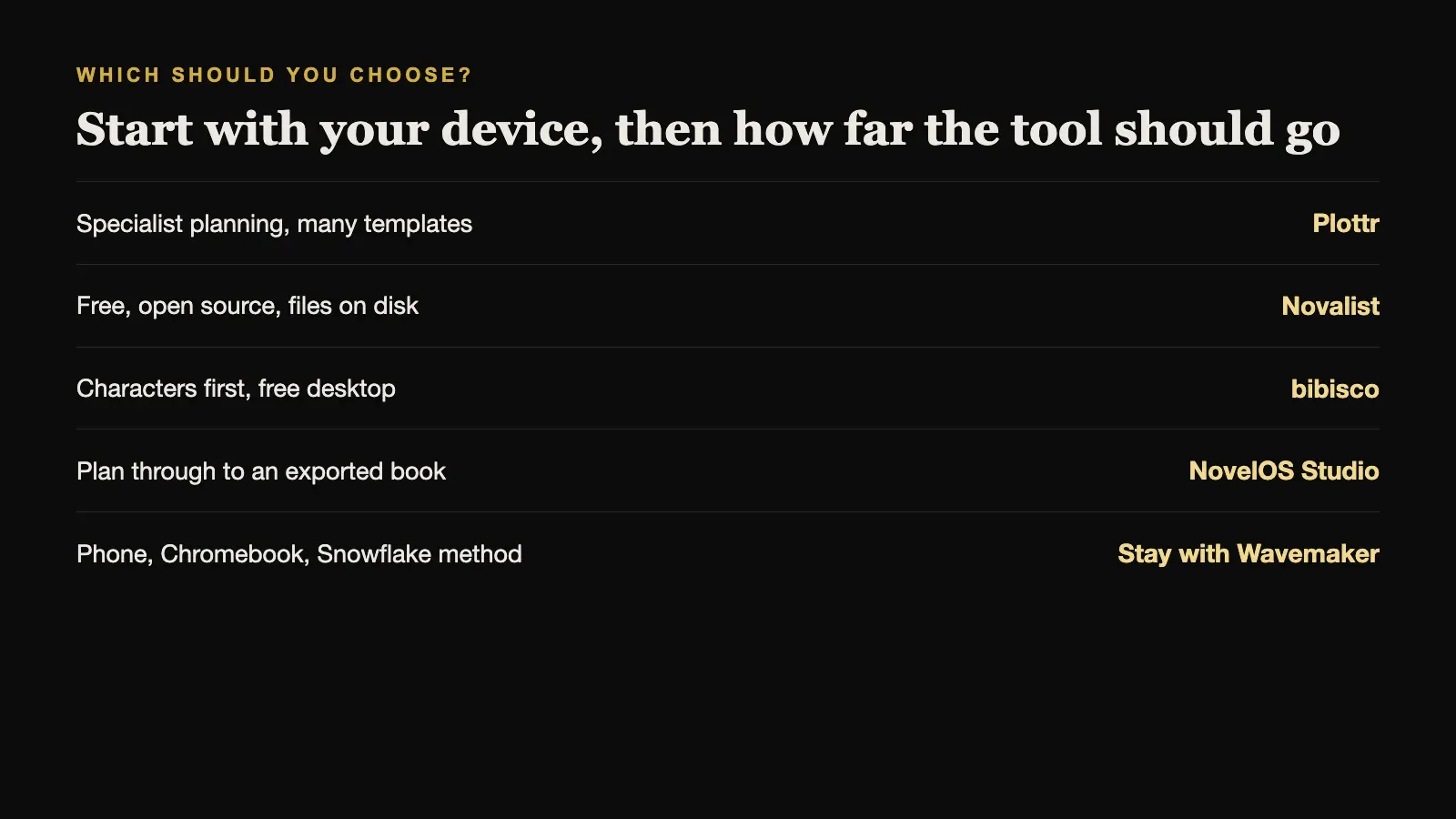
The short answer. For specialist plot-line planning with many templates, choose Plottr. For a free, open-source desktop studio with project files on disk, choose Novalist. For a free, simpler desktop tool focused on characters, choose bibisco. For planning, drafting, and full book export in one offline desktop application, bought once, choose NovelOS Studio.
Wavemaker Cards Alternatives Compared
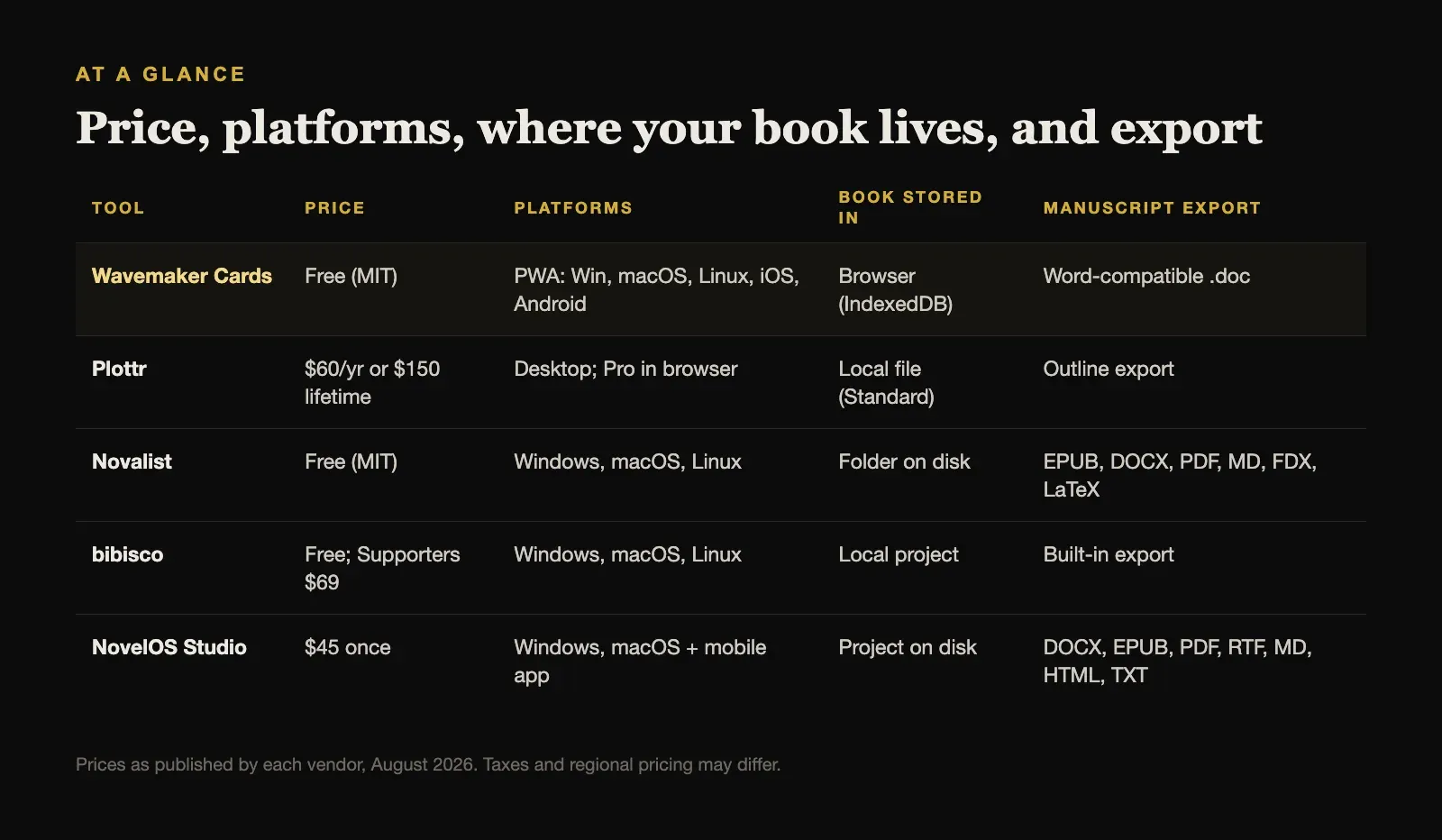
| Tool | Price | Platforms | Book stored in | Manuscript export |
|---|---|---|---|---|
| Wavemaker Cards | Free (MIT) | PWA: Win, macOS, Linux, iOS, Android | Browser (IndexedDB) | Word-compatible .doc |
| Plottr | $60/yr or $150 lifetime | Desktop; Pro in browser | Local file (Standard) | Outline export |
| Novalist | Free (MIT) | Windows, macOS, Linux | Folder on disk | EPUB, DOCX, PDF, MD, FDX, LaTeX |
| bibisco | Free; Supporters $69 | Windows, macOS, Linux | Local project | Built-in export |
| NovelOS Studio | $45 once | Windows, macOS + mobile app | Project on disk | DOCX, EPUB, PDF, RTF, MD, HTML, TXT |
Prices are as published by each vendor in August 2026 and exclude tax.
What Wavemaker Cards Does Better Than Most Paid Tools
Before switching, weigh what you would give up:
- It is free and open source, with optional Patreon or PayPal support rather than a subscription.
- It runs everywhere, including Linux, Chromebooks, phones, and tablets, from one installable web app.
- It has named planning methods built in. The Snowflake planner and Grid Planner are rare as dedicated tools.
- Its Mind Map is genuinely useful for brainstorming how ideas, characters, and places connect before the plot settles.
- Your data stays with you, in the browser and optionally in your own Google Drive.
For writers who plan on a phone or work on Linux, that combination is hard to match.
1. Plottr: Best Specialist Visual Outliner
Plottr is the best-known dedicated planning tool for fiction. It lays plot lines out as rows against chapters, making it easy to see how a main plot, subplots, and character arcs run in parallel, and it has a large template library and series planning.
Plottr Standard costs $60 per year or $150 for a lifetime licence and works offline on the desktop. Plottr Pro adds a browser app, which covers Chromebooks and Linux, and real-time collaboration, with every collaborator needing a Pro subscription. Like Wavemaker, Plottr is a planner first; you usually draft elsewhere.
Choose Plottr when you want a polished, template-rich planner and are happy to pay for it.
2. Novalist: Best Free, Open-Source Desktop Studio
Novalist shares Wavemaker’s MIT licence and price, but stores the project differently: as an ordinary folder of scene files and JSON metadata on your disk, with a built-in Git client for version history. That removes the browser-storage concern entirely.
It runs on Windows, macOS, and Linux, and adds a Codex for characters, locations, items, and lore, a layered map editor, a plot grid, corkboard, outliner, and timeline, and export to EPUB, DOCX, PDF, Markdown, Final Draft, and LaTeX. The trade-off is complexity, and it has no phone app today.
Choose Novalist when you want to stay free and open source but need real files on disk and full book export.
3. bibisco: Best Free, Simpler Desktop Tool
bibisco is a calmer choice. Its Community Edition is free, the Supporters Edition costs $69 once, and it runs offline on Windows, macOS, and Linux, with mobile access through bibisco Everywhere. It is built around structured character development, with character interviews and novel analysis, and recent releases added novel outlines, mind maps, and timeline improvements.
It has no Snowflake or Grid Planner, but its character work is deeper than Wavemaker’s cards.
Choose bibisco when your novel starts from characters and you want a free, local desktop tool.
4. NovelOS Studio: Best for Planning Through to a Finished Book
NovelOS Studio is the alternative for writers who have outgrown planning in one tool and exporting a .doc to finish somewhere else. It keeps the whole novel in one desktop project: Spark boards for early ideas, Blueprint boards for plot structure, characters with family trees, worldbuilding records with custom properties, maps drawn in Cartograph, and a focused manuscript editor. Every scene carries its viewpoint, status, synopsis, cast, and location, and writing goals, deadlines, and a yearly activity view track the draft.
It costs $45 once for Windows and macOS, and the same licence activates an installable mobile app. It works fully offline, stores the project on your computer’s disk rather than in browser storage, and needs no account. It exports DOCX, EPUB, PDF, RTF, Markdown, HTML, and plain text, and moves the whole project between computers as one .novelos archive.
What it does not offer is Linux, a free tier, or a dedicated Snowflake planner.
Choose NovelOS Studio when you want your planning, your world, and your manuscript in one place, with the finished book exported in the formats editors and readers actually use.
When Wavemaker Cards Is Still the Right Choice
Stay with Wavemaker Cards if you plan on a phone or tablet, work on Linux or a Chromebook, or specifically want the Snowflake method or its Grid Planner. It is also a very good free way to find out which planning style suits you before paying for anything.
If you stay, protect the work. Export a .wm4 backup regularly, keep a copy outside the browser, and connect Google Drive if you use more than one device.
Keeping a Browser-Based Novel Safe
The browser-storage point applies to any web app that works offline, not only Wavemaker, so it is worth a simple routine:
- Back up on a schedule, not when you remember. Weekly at minimum, and after any long session.
- Keep backups outside the browser, in a folder that your normal computer backup also covers.
- Test a restore once. Open a backup on another device, or in a private browser profile, and confirm the book is all there.
- Be careful with browser clean-up. Clearing site data, some privacy extensions, and storage-saving settings on phones can remove offline data.
A desktop application that saves files to disk avoids most of this, which is the main reason writers moving on from Wavemaker choose one. To be fair, the same care applies to any installable web app on a phone, including the NovelOS mobile app, which is why it exports and imports the same .novelos archive as the desktop.
How to Choose
Start with the device you write on. On phones, tablets, Chromebooks, or Linux, the realistic choices are Wavemaker itself, Plottr Pro in a browser, Novalist or bibisco on Linux, and bibisco Everywhere on mobile.
Then decide how far the tool should take you. For planning only, Plottr. To stay free and open source with full export, Novalist. For characters first, bibisco. For planning through to a finished, exported book on Windows or Mac, NovelOS Studio.
Sources and further reading
Prices and features were checked against first-party sources in August 2026 and may change.