 Themes and Languages
Make the studio look and read the way you like
NovelOS Studio is a writing app you can make your own. Pick one of 23 themes or set the colours yourself, and use the whole app in any of 23 interface languages, on the computer and on the phone.
- $45 once, no subscription
- Windows and macOS
- Phone app included
- Works offline
 Windows
 macOS
macOS
 Mobile
Part of the 25 minute walkthrough. Watch the full tour from the start Watch on YouTube
23 colour themes for the whole app
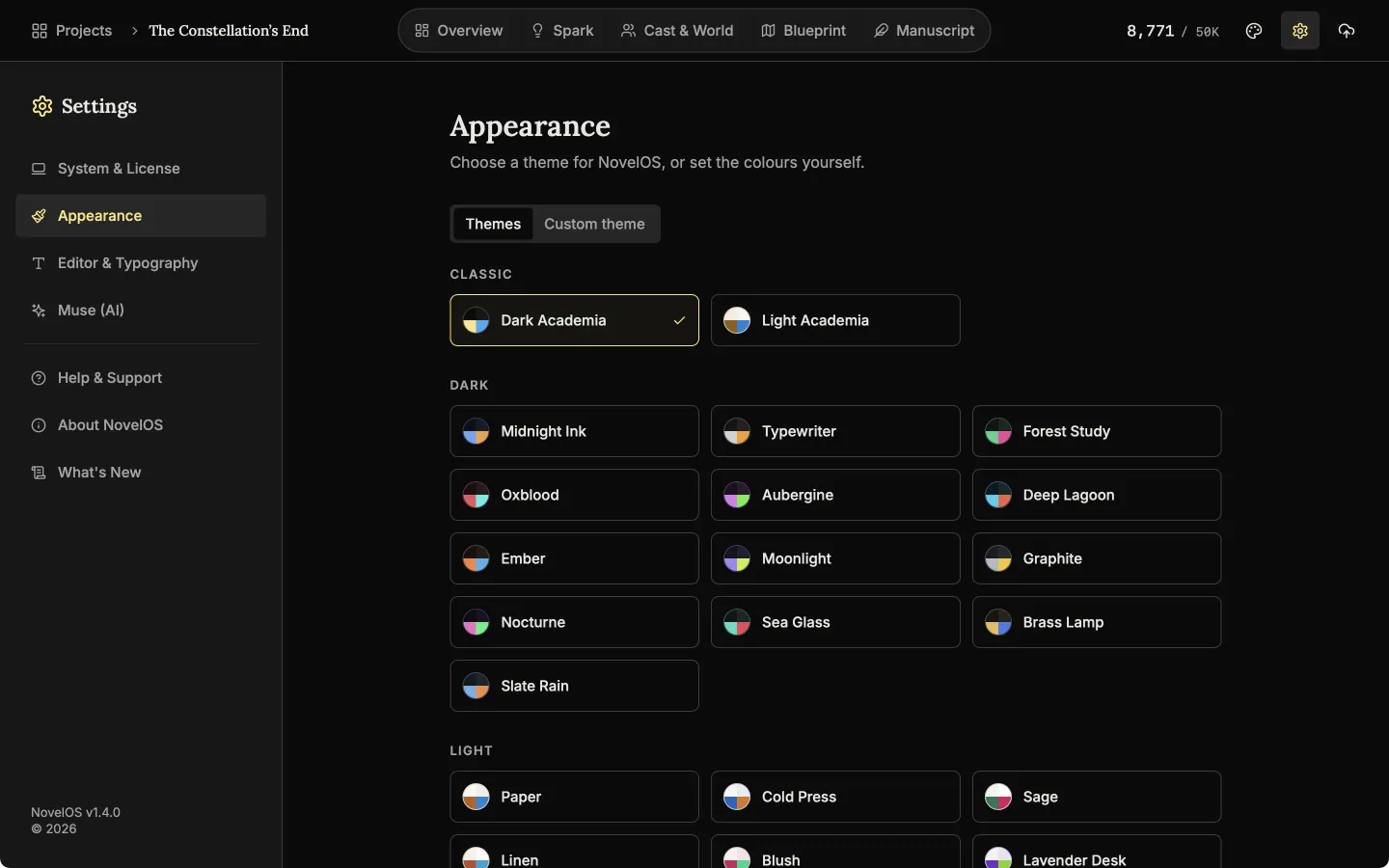
Themes come in three groups: Classic, Dark and Light. Click one and the whole app changes at once. Dark Academia is the default.
Themes
Choose from 23 themes, light and dark. The change is instant.
Set the colours yourself
The custom theme editor starts from the theme you are using. Change a colour, and it warns you if two colours are too close to read.
Custom theme
Build your own theme colour by colour. The editor warns you when text would be hard to read.
The whole app in 23 languages
Arabic, Chinese (Simplified and Traditional), Danish, Dutch, English, Finnish, French, German, Hebrew, Hindi, Indonesian, Italian, Japanese, Korean, Malay, Polish, Portuguese, Spanish, Swedish, Thai, Turkish and Vietnamese.
Interface language
Pick the language of the app from a list of 23 in Settings. The change applies at once, with no restart. Here the app is already in Japanese with the list open.
Choose the font and spacing of the page you write on
The Editor & Typography settings set the font, text size, line spacing and paragraph spacing of your writing page. They are separate from the colour theme around it.
Editor and typography
Set the font, text size, line spacing and paragraph spacing of the editor, and the voice and speed for reading aloud.
Also here
- Write your book in any language. The app's language and the book's language are separate settings. Word counts are accurate for Chinese, Japanese and Thai. Voice features are English only.
- Theme picker in the navigation bar. Switch theme at any time without opening Settings.
- Each device keeps its own. Importing a project does not change the language or theme of that device.
Related features
- The phone app
The same studio on iOS and Android with the same licence, and one file that moves a project between devices.
- The manuscript editor
Write the book in chapters and sub-chapters, with Zen, Typewriter and Vanishing modes and search that forgives typos.
- Book Preview
See your book as printed pages at your trim size while you are still writing it.
- Publish and export
Export to Word, EPUB, PDF, HTML, Markdown, RTF and plain text. The PDF follows your trim size, margins and font.
Common questions
Is there a dark mode?
Yes. The default theme, Dark Academia, is dark, and there are 23 themes in three groups: Classic, Dark and Light.
Can I make my own theme?
Yes. The custom theme editor starts from the theme you are using and warns you when two colours would be hard to read together.
Can I write a book in a language the app is not translated into?
Yes. The app's language and the book's language are separate settings.
Do the voice features work in my language?
Only in English for now. Write by voice, read aloud and audiobook export work in English projects.
Does changing the theme change how my exported book looks?
No. The theme is how the app looks to you. The printed page is set in Book Layout.
Is it included in the $45?
Yes. Every theme and every language is included. There are no paid themes.
Guides for your setup
Exposition in Motion: Give Readers the Right Fact at the Right Moment
Place exposition where readers need it by testing what each fact helps them follow, judge, or reinterpret in the current scene.
Read article
Book Blurb vs Synopsis: Build Promise and Proof
Compare a book blurb with a synopsis, then use a promise-to-payoff ledger to write reader-facing copy and a spoiler-complete submission document.
Read article
A Clarity Test for Every Dialogue Tag
Test dialogue tags by speaker clarity, reset points, placement, action, and rhythm so readers never need to reconstruct who spoke.
Read articleWriting Tips & First Edition Access.
Craft guides and product updates in your inbox.
Finish your story. Keep your tools.
One payment and it is yours. No subscription, no account, no telemetry. Watch the full walkthrough before you buy.